

Why Requirements Traceability Matters
Requirements traceability answers a simple question: can you prove that every requirement has been tested, and that every test maps back to a business need?
Without traceability, teams run into the same problems repeatedly:
- •A feature ships untested because nobody realized the requirement existed
- •A test fails but nobody knows which business requirement is affected
- •A requirement changes mid-sprint and the team has no way to identify which test cases need updating
- •An audit asks for evidence that a feature was validated, and the team scrambles to reconstruct the paper trail
Traceability eliminates this guesswork. In BesTest, every requirement can be linked to the test cases that validate it, and every test case can be traced back to the requirements it covers. This bidirectional linking gives you a living map of your Space's quality status.
For regulated industries (finance, healthcare, automotive), traceability is often a compliance requirement. But even for teams without regulatory obligations, it reduces risk and speeds up release decisions. When you can see at a glance that 95% of requirements are covered and passing, you have real data to support a go/no-go call.
Creating Requirements in BesTest
Requirements in BesTest are standalone entities, stored separately from Jira issues. This keeps your Jira backlog clean while giving you a dedicated space for requirement management.
Navigate to Requirements
- 1Open your Jira Space
- 2Click "BesTest" in the Space menu bar at the top
- 3Select the "Requirements" section
Create a Requirement
- 1Click "Add Requirement"
- 2Fill in the General tab:
| Field | Purpose | Example |
|---|---|---|
| Name | Short, specific description of the behavior | User can reset password via email link |
| Description | Detailed specification with acceptance criteria | The system sends a password reset email within 30 seconds. The link expires after 24 hours. The user must set a password that meets complexity rules. |
| Requirement Type | Functional, Non-Functional, Business, Technical or User Interface | Functional |
| Significance | Impact and Complexity, each Low / Medium / High | Impact High, Complexity High |
- 3Click "Save Requirement"
Set the significance now - it decides how many test cases the requirement needs (more on that below).
Link to Jira Work Items
Open the requirement, go to the Links tab and click "Add Links". On the Work Items tab, search for the story, epic or task by key or title, select it and confirm. The link also shows in the BesTest panel on the Jira work item.
Use Create in bulk in the menu next to Add Requirement (one name per line, shared fields set once), or bulk create from the BesTest panel on a Jira epic so every requirement is linked to it. See Create in bulk.
Structuring Requirements Effectively
Write requirements at a level of granularity that maps well to test cases. A requirement like "The application works correctly" is too broad to test meaningfully. Break it down:
- •Too broad: User authentication works
- •Right level: User can log in with email and password
- •Right level: User receives an error message for incorrect credentials
- •Right level: Account locks after 5 consecutive failed login attempts
Each of these can have dedicated test cases, and each can be independently tracked for coverage.
Linking Test Cases to Requirements
Once you have requirements and test cases, you need to connect them. BesTest provides two paths for creating these links, and the resulting connection is the same regardless of which direction you start from.
Method 1: From the requirement's Traceability card
The requirement's Overview has a Traceability card: the work items it comes from, the requirement, and the test cases that test it.
- 1Open a requirement
- 2In the Traceability card, click "Add Existing"
- 3Search by test case name or key, select it and confirm
No test cases yet? "Create & Link" in the same card creates them in bulk (one name per line), already linked to the requirement.
The Traceability card shows the linked test case, and the Coverage card updates the count ("Test cases: N linked of T needed") and the coverage value.
Method 2: From the test case's Links tab
Every entity in BesTest (requirements, test cases, test cycles) has a Links tab.
- 1Open a test case
- 2Go to the Links tab and click "Add Links"
- 3Pick the requirement and confirm
Many-to-Many Relationships
BesTest supports many-to-many linking:
- •One requirement can be linked to multiple test cases (different scenarios, edge cases, negative tests)
- •One test case can be linked to multiple requirements (a login test might validate both "user can authenticate" and "session is created on login")
There is no limit on the number of links. Use as many as accurately represent the relationships in your system.
Verifying Links
After linking, check both sides:
- •On the requirement, the Traceability card shows the linked test cases ("All links" opens the Links tab) and the Coverage card shows the coverage value
- •On the test case, the Links tab shows all linked requirements
If a link is incorrect, you can remove it from either side without affecting the underlying entities.
Understanding Coverage Significance
BesTest does not treat coverage as a simple binary check. A requirement is not "covered" just because it has one linked test case. Instead, BesTest uses a significance-based coverage model that accounts for how important and complex the requirement is.
How Significance Works
Each requirement's significance comes from two inputs, each Low, Medium or High:
- •Complexity: How technically complex is the feature? A UI label change is Low. A payment processing flow is High.
- •Impact: How critical is it to the business? A cosmetic preference is Low. A security authentication flow is High.
Together (impact x complexity) they give a significance of Low, Medium, High or Critical - Critical when both are High. Higher significance needs more test cases to count as Covered.
What "Covered" Actually Means
A requirement's coverage in BesTest reflects whether it has enough test coverage relative to its significance:
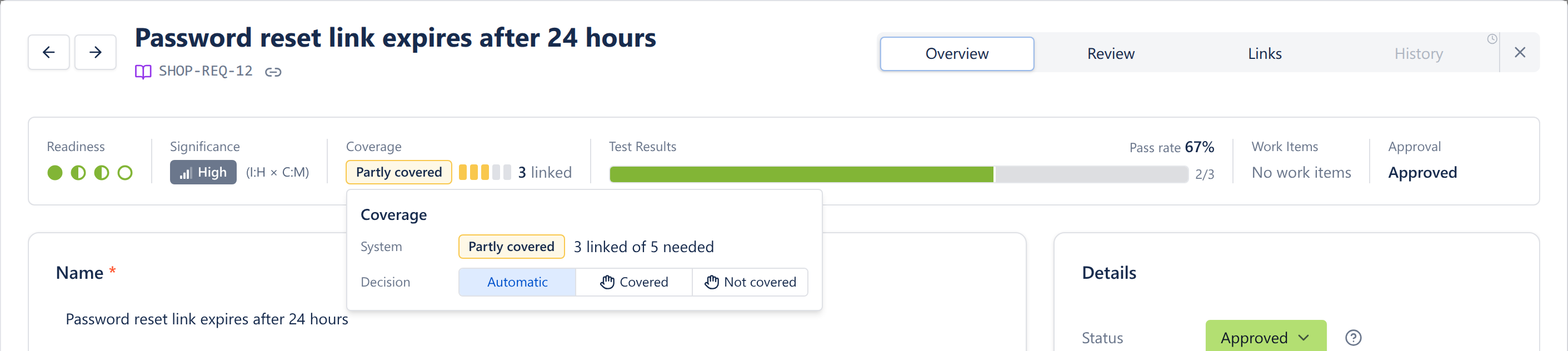
- •Covered: The number of linked test cases meets the significance threshold (Low 1, Medium 3, High 5, Critical 8)
- •Partly covered: Some test cases are linked, but fewer than the threshold
- •Not covered: No test cases are linked
So a Critical requirement needs eight linked test cases - happy paths, edge cases, error scenarios - before BesTest marks it Covered, while a Low one is Covered with a single test case. The same value shows in the catalog, filters, reports and dashboard gadgets.
Manual Override
You can override the decision: click the requirement's coverage chip and set Decision to Covered or Not covered (or back to Automatic). A hand icon shows that a person decided, and the Coverage set by filter finds those requirements later. This is useful for requirements validated through other means (automated tests outside BesTest, third-party certifications, etc.). Details: Requirements.
Why This Model Matters
A flat "has at least one test case" model gives a false sense of security. A payment processing requirement with one basic happy-path test is technically "linked" but far from adequately tested. The significance model pushes teams to allocate testing effort proportionally to risk, which is how experienced QA teams already think about coverage.
Live preview - this is the real BesTest UI
Using Coverage Reports for Release Decisions
Traceability data is only useful if you can see it clearly. BesTest's coverage reporting surfaces the information you need for release readiness decisions.
Requirements catalog
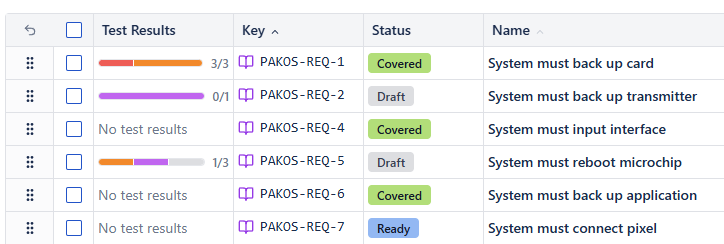
The Requirements catalog shows a Coverage column and a Test Results column (the latest executions of each requirement's test cases). Use the Coverage filter to list:
- •Requirements that are Not covered or Partly covered (gaps that need test cases)
- •Requirements whose linked test cases failed recently (the Test Results column)
Traceability reports
In Reports, the Requirements Traceability Matrix lists every requirement in a folder with its test cases, latest results and linked bugs, and gives each a High / Medium / Low risk level. The Work Item Traceability report does the same for one Jira epic, story or release, and the BesTest panel on the work item shows the same release readiness. See Reports. Need a matrix for a stakeholder who isn't in Jira? The free traceability matrix generator builds one in your browser.
Using Coverage Data in Sprint Reviews
At the end of a sprint, pull up the requirements coverage view and walk through it with the team:
- 1New requirements added this sprint: Are they all linked to test cases? Are they Covered?
- 2Requirements with failed tests: What failed, and is there a fix in progress?
- 3Coverage percentage overall: Is it trending up or down compared to the last sprint?
This gives the team and stakeholders concrete data instead of opinions about quality.
Release Go/No-Go Decisions
For release decisions, consider these coverage checkpoints:
| Checkpoint | What to Check | Action if Not Met |
|---|---|---|
| Coverage gaps | Any High or Critical requirements Not covered or Partly covered? | Write missing test cases before release |
| Failing tests | Any covered requirements with failing test cases? | Fix defects or defer the affected feature |
| Execution completeness | Have all test cases in the release cycle been executed? | Complete remaining executions |
Dashboard Gadgets for Stakeholders
BesTest's Jira dashboard gadgets let delivery managers and product owners monitor coverage without opening BesTest. Add a coverage gadget (for example Requirement Coverage Breakdown or Requirement Coverage Matrix) to your team's Jira dashboard so traceability is visible to everyone, not just QA.
Tips for Maintaining Traceability
Traceability is easy to set up but takes discipline to maintain. Here are practical tips from teams that keep their traceability clean over time.
Link as You Go
Do not batch-link requirements to test cases at the end of a sprint. Instead, make it part of your workflow:
- •When you create a new requirement, set its impact and complexity and check how many test cases it needs
- •When you write a new test case, link it to the relevant requirement before moving on
- •When a requirement changes, review and update its linked test cases
Review Coverage Weekly
Set a recurring 15-minute check: open the requirements list, filter Coverage for "Not covered" and "Partly covered," and assign owners to close gaps. Small, regular checks prevent coverage debt from piling up.
Use Consistent Naming
Name requirements and test cases so that related items are easy to find:
- •Requirement: "User can reset password via email link"
- •Test case: "Verify password reset email is sent within 30 seconds"
- •Test case: "Verify password reset link expires after 24 hours"
Clear, descriptive names make it obvious which test cases belong to which requirement, even without looking at the links.
Handle Requirement Changes
When a requirement changes:
- 1Update the requirement text in BesTest
- 2Review all linked test cases - do they still validate the updated requirement?
- 3Update or add test cases as needed
- 4Re-execute affected test cases in the next cycle
This keeps your traceability accurate through the natural evolution of your Space.
Sign Off Requirements First
Where business sign-off matters, send requirements to review before test cases are written against them. Requirements move from Draft to In Review to Approved (or Changes Requested), and every round is kept in the review audit trail. See the test case review tutorial, which covers both.
Involve the Whole Team
Traceability should not be one person's responsibility. Developers can help by flagging when code changes affect requirements. Product owners can help by keeping requirement descriptions current. QA leads can monitor coverage trends and flag gaps early.
When traceability is a shared practice, it stays accurate. When it's one person's job, it falls behind.
Frequently Asked Questions
What does "Covered" mean in BesTest?
In BesTest, a requirement is "Covered" when it has enough linked test cases for its significance, which comes from impact x complexity: Low needs 1, Medium 3, High 5 and Critical 8. With fewer it is "Partly covered", with none "Not covered". You can override the decision on the requirement if it's validated through other means.
Can I link one test case to multiple requirements?
Yes. BesTest supports many-to-many relationships between requirements and test cases. A single test case can be linked to multiple requirements, and a single requirement can be linked to multiple test cases. This reflects the real-world reality that tests often validate more than one behavior.
How is traceability different from test coverage?
Traceability is the bidirectional link between requirements and test cases - knowing which tests validate which requirements and vice versa. Test coverage is the measurement of how much of your requirements are validated by tests. Traceability enables coverage measurement. Without traceability links, you cannot calculate coverage accurately.
Start Building Traceability Today
Install BesTest and link your first requirement to a test case in minutes. Free for up to 10 users.
Install BesTest Free