Requirement & Test management for Jira.
Now with AI agents.
The source of truth linking requirements, test cases, coverage, and results - readable and writable by your team, your CI pipeline, and your coding agent, through a test management MCP for Jira that knows your requirements.
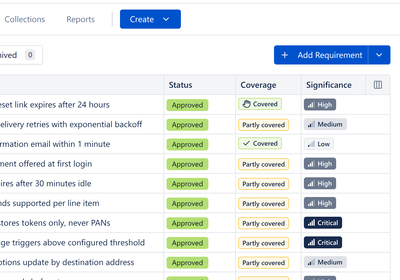
| Key | Name | Status | Significance |
|---|---|---|---|
| PHX-REQ-142 | Password reset by email | Changes Requested | High |
| PHX-REQ-143 | MFA enrolment | In Review | Critical |
| PHX-REQ-150 | Checkout flow | Approved | Critical |
| PHX-REQ-161 | Webhook retry & backoff | Draft | Medium |
| PHX-REQ-170 | Session timeout | Approved | Low |
Password reset by email
 Xray
Xray Zephyr Scale
 TestRail
 AIO Tests
 RTM
RTMOne source of truth.
Three ways to work.
A complete set of test-management tools your team uses by hand today - built so the same requirements, tests, and coverage can be driven by your CI pipeline and your AI agents next.
Manual & UAT testing
Create requirements and test cases, link them for coverage, and run manual or user-acceptance cycles step by step - then report and audit. All by hand, inside Jira.
- Manual & UAT cycles with business stakeholders
- Requirements ↔ tests ↔ executions linked
- Reviews, reporting and a review audit trail
Test automation
Connect your CI. Push results from your pipeline into the same coverage picture, and pull test data out through the REST API - manual and automated in one view.
- Full REST API for tests, runs & results
- Results flow in from every pipeline run
- Manual & automated, one coverage picture
 Playwright
 Cypress
 Selenium
 GitHub Actions
 GitLab CI
 Jenkins
 Postman
AI-supported testing
Your agent talks to the foundation over MCP: it reads requirements and coverage, generates automated tests, catches and re-runs flaky ones, and syncs results back.
- MCP server - bring any AI agent
- Requirements-aware test generation
- Detect, regenerate & re-run flaky tests
- Scoped to your permissions · code stays in your repo
 Claude
 OpenAI Codex
 Cursor
 GitHub Copilot
 Gemini
 Windsurf
 Atlassian Rovo
What your team gets.
The surfaces below mirror the BesTest UI, rendered live on this page - the dashboards are the app's actual components, the rest are faithful recreations of what you get after install. Scroll through all 6 core screens, or jump to any of them.
BesTest lives inside your Jira work item.
No separate tool to learn. Open any work item and the BesTest panel sits right inside it - every requirement, test case, cycle and execution linked to it, plus how to switch it on.
Apply a promo code at the payment step
 BesTestBesTest
- 1Switch it on onceOpen the Apps (...) menu on any work item and pick BesTest. The panel pins to the bottom of the work item - for the whole team.
- 2Release readiness, right hereOne bar for everything this item is covered by. Toggle in the coverage that arrives via its requirements, or roll up every child issue beneath it - the answer to "can we ship this?" without opening a report.
- 3Every linked object, liveRequirements, test cases, cycles and executions for this work item - each with its real status, recent runs and per-requirement coverage.
- 4Create or link in placeSpin up a requirement or test case inline, or Link existing ones - without leaving Jira.
Your whole test library, organized.
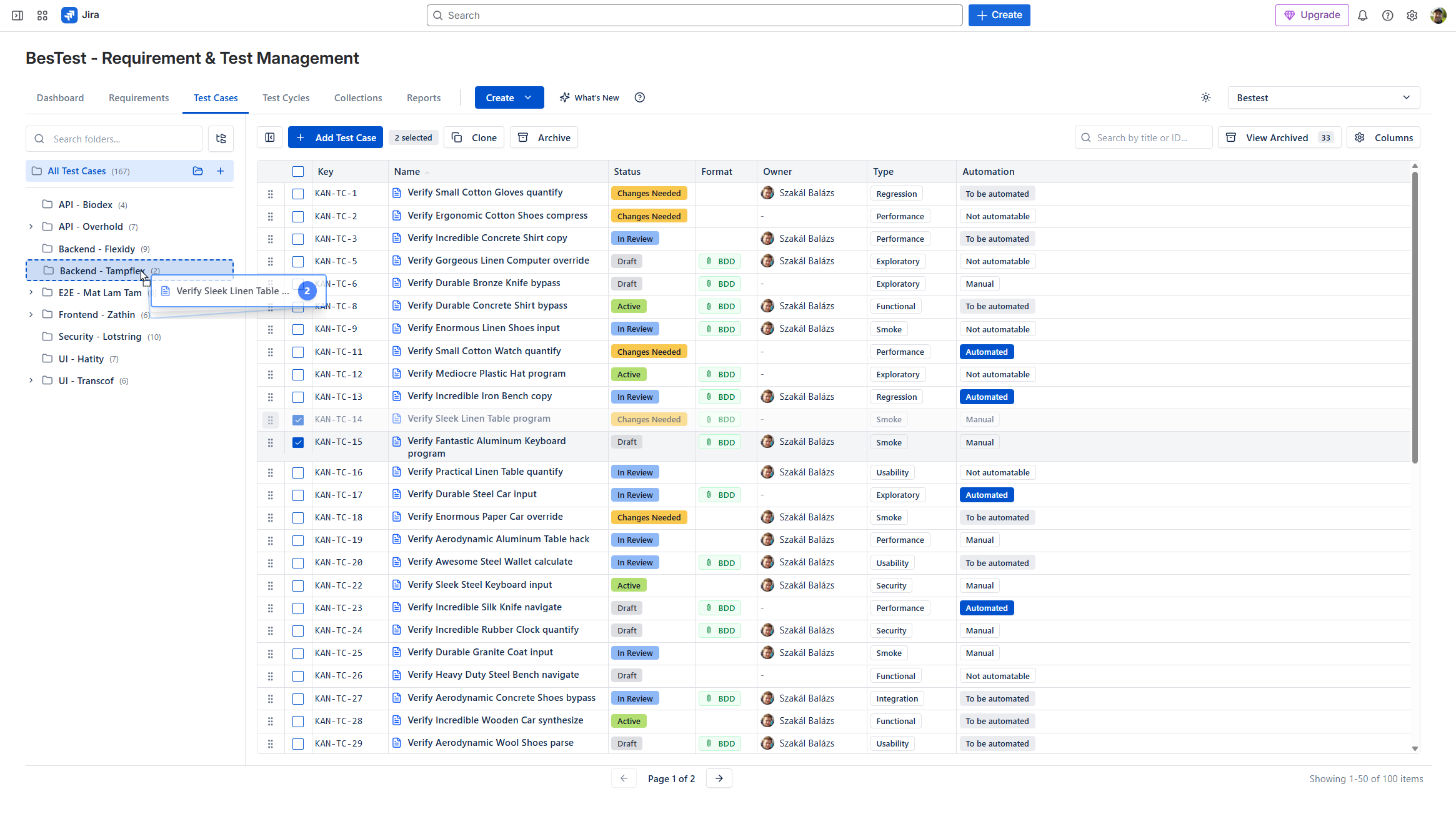
Folders on the left, your items in the middle - the same catalog for requirements, test cases, cycles, collections and campaigns. This is how everything is stored.
folder = "Authentication" AND (priority in (High, Highest) OR label ~ "regression")Apply12 resultsClear| Key | Name | Status | Priority | Owner | Updated | |
|---|---|---|---|---|---|---|
| PHX-TC-318 | Reset link expires after 24 hours | Active | High | MM. Lee | 2d ago | |
| PHX-TC-319 | Invalid email shows inline error | Active | Medium | MM. Lee | 3d ago | |
| PHX-TC-320 | Rate limit after 5 failed attempts | Changes Needed | High | DDana K. | 1d ago | |
| PHX-TC-150 | Session times out after idle period | Active | Medium | DDana K. | 5d ago | |
| PHX-TC-91 | Password complexity is enforced | In Review | Low | AA. Roy | 1w ago | |
| PHX-TC-204 | Remember-me persists for 30 days | Draft | Low | TT. Wong | 2w ago | |
| PHX-TC-377 | Account locks after repeated failures | Active | Critical | DDana K. | 4d ago | |
| PHX-TC-143 | MFA enrolment sends SMS code | Active | High | AA. Roy | 6d ago | |
| PHX-TC-161 | Reset token is single-use | In Review | High | PP. Costa | 3d ago | |
| PHX-TC-188 | Expired link shows resend option | Active | Medium | MM. Lee | 1w ago | |
| PHX-TC-205 | Reset disabled for SSO accounts | Archived | Low | SS. Varga | 1mo ago |
- 1Folder treeNested folders per project. Every object type - requirements, test cases, cycles, collections, campaigns - has its own catalog.
- 2BQL - query your tests like JQLHit Filter and write real queries - folders, fields and labels composed with AND/OR - or build the same rule visually. Built to scale to thousands of cases.
- 3Live statusesAtlassian-style lozenges show review and execution state at a glance.
- 4Act on many at onceSelect any cases and the floating bar appears - add them to a cycle, move folders, or archive your whole selection in one go.
Five objects. Each one first-class.
Open any item and the full viewer opens. The tabs change per object: requirements have Coverage, cycles have an Execution Dashboard, collections have Rules. Switch between them.
Run every test, step by step.
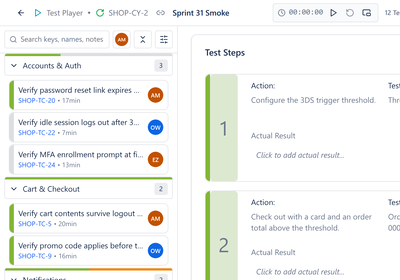
The manual test player: pick a result for each step, capture evidence, and raise a linked Jira defect without leaving the run. This is UAT and manual testing, done inside Jira.
Brute-force protection locks the account after repeated failures, and a locked account recovers cleanly.
A registered account with a known password; rate limiting enabled on staging.
Submit a wrong password 5 times in a row
user: demo@acme.io
Each attempt returns "invalid credentials"
Submit a 6th attempt
same user
Account is locked; a lockout message is shown
Sign in with the correct password after the lockout window
correct password
Access is granted; the failure counter resets
- 1Live cycle stats and timerExecution progress, the running timer and per-status counts stay pinned in the header while you work the cycle.
- 2Find your next test in secondsSearch keys, names and run notes, switch on My work, filter by status, bugs, notes, over time or tends to fail - then Next to do opens the next open test. Try the filter button.
- 3Result per stepPass, fail, block - or raise a Jira bug - right on the step, with the actual result recorded inline. Try it.
Release-readiness on your Jira dashboard.
Twenty configurable gadgets - coverage, execution status, trends, active cycles - right where your team already looks. Management gets the answer to "are we ready to release?"
Prove coverage, end to end.
The Requirements Traceability report - the one auditors and managers ask for: every requirement mapped to its test cases, colored by the latest run, with the defect trail attached. It is one of five purpose-built reports, each hand-tailored to a real release question, and exports the moment the audit asks.
The Atlassian MCP handles Jira.
The BesTest MCP handles testing.
Every vendor brings their own MCP to the party. You add both to your agent once, then watch what one sentence sets in motion.
What is our coverage on the checkout requirements, and which gap is riskiest?
+ more Atlassian ships thisAtlassian MCP
Officially the Rovo MCP Server. Most people say "the Jira MCP".
idle - no Jira call needed here
We ship thisBesTest MCPIn beta. Create your own token in the app. GA soon.
What lands
Coverage at 71%, with the riskiest gap named rather than just the lowest one.
Riskiest is not simply lowest: significance weights complexity times impact.
Plan in Jira. Test in BesTest. One conversation.
Illustrative conversation · the BesTest MCP is in beta
How it fits Rovo
Through your agent, BesTest pairs with Atlassian’s Teamwork Graph: their MCP brings the org-wide context, ours brings the testing depth.
Smart Collections build your cycles for you.
Gather test cases three ways - then turn the collection into a cycle in one click, and it stays current as your library grows.
- 1Pick them by handA fixed list of test cases you choose - simple and explicit.
- 2Define a ruleDynamic membership from folders, fields and labels - composed with AND/OR, as deep as you need.
- 3Point at requirementsSelect requirements and the collection resolves their coverage when you use it - always the current set.
Teams switch and stay.
“We've tried a lot of test tools over the years, but none really fit how our team works with test sessions. BesTest let us set up tests and run them with full traceability, nested folders, and issue links for any found issues. It fits our workflow really well.”
“Setup took like 5 minutes and there's basically no learning curve. Everything included - requirements, test cases, executions, reports. It just works. The folder/collection organization is intuitive and the built-in review workflow for test cases is handy. Feels like it was actually made by testers who get it.”
“BesTest is an outstanding application that provides a fantastic approach to test management within Jira Cloud. Its intuitive interface, seamless integration, and well-designed features make it easy to organize test cases, execute test cycles, and track results efficiently. Highly recommended!”
More built in. A fraction of the price.
| BesTest | Zephyr | Xray | AIO Tests | RTM | |
|---|---|---|---|---|---|
| Built-in requirements module | |||||
| No Jira issue bloat (separate DB) | |||||
| Built on Atlassian Forge | partial | partial | partial | ||
| Test case review workflow | partial | partial | |||
| Smart Collections (auto cycles) | |||||
| Release readiness | partial | partial | |||
| REST API & automation | |||||
| Official MCP server | |||||
| Free tier (all features) | |||||
| Price / user at 100 users | $1.79 | $6.81 | $7.28 | $2.30 | $2.01 |
REST API, CI/CD and MCP integration are available now. Prices per user per month at 100 users, from the Atlassian Marketplace, October 2026.
Every feature, every tier.
No feature gating. Free up to 10 users - while Xray and Zephyr charge from your very first user - and 3-4x cheaper than either at scale.
- Requirements + test cases
- Smart Collections & reviews
- Reporting & dashboards
Live in about a minute.
- ~30 seconds1.Install from the Marketplace
One click on "Get it now" - no sales call, no signup form, no separate login.
- ~1 minute2.Enable it on a Space
Flip it on in Space settings. BesTest shows up in the Space menu, where your team already works.
- right away3.Run your first test
Create a requirement, link a test case, hit run. No training course required.
We are taking BesTest out of Jira
Most of what makes BesTest good was never really about Jira. The requirements, the test cases and the coverage model are ours. A standalone version is in the works for teams who do not run Jira at all.
- The same requirements, test cases and coverage engine
- Cloud-hosted, in the EU, US or India
- One email at launch, nothing else
Want to know when it opens?
Learn the craft.

Questions, answered.
Is BesTest really free?+
Yes - free for up to 10 users with every feature included. Paid tiers start at $1.79/user/month and scale down at volume.
Does it work with my Jira?+
BesTest installs from the Atlassian Marketplace as a Jira app built on Forge. No separate login, no new interface - it follows the Atlassian Design System.
Where is my data hosted?+
BesTest supports regional hosting in the EU, US, and India, and keeps your test library from cluttering Jira issues so Jira stays fast.
Is there a REST API and AI agent (MCP) support?+
Yes. Create your own token in the app (API & MCP tokens in the app menu) - no request form, no waiting - and connect a CI pipeline or an agent like Claude or Cursor to the same requirements, test cases and results.
How is it different from Xray or Zephyr?+
A built-in requirements module with significance-weighted coverage, built-in review workflows, Smart Collections, and no Jira issue bloat - at a fraction of the price.
Bring requirements and tests together in Jira.
Free for up to 10 users, every feature included. One click from the Atlassian Marketplace, about a minute to enable on a project.