
User Acceptance Testing (UAT) in Jira
Business stakeholders run UAT in the Jira they already use, and the UAT report lives on your Jira dashboard as live gadgets
User acceptance testing (UAT) is the last check before release: business users confirm the software does what they need. BesTest runs it inside Jira. Stakeholders follow a guided Test Player, and your UAT report sits on the Jira dashboard as gadgets - progress, pass rate, requirement coverage and defects, updating as people test. Looking for Xray-style UAT dashboard gadgets? BesTest is a Jira app alternative that ships them, without turning test runs into Jira issues.
Try BesTest FreeThe Challenge
Most UAT failures are tooling failures. Traditional test management tools - and even Jira-based ones like Xray - were built for QA engineers, not business stakeholders:
- •Standalone UAT tools mean another login and another interface, and stakeholder participation drops the moment people have to leave their daily workspace
- •In Xray, UAT reporting is built on Test Plan and Test Execution issues, so business testers face cluttered, QA-grade screens and your project fills up with test issues
- •Intimidated business users skip steps, test from memory, or quietly stop participating - and you find out in the release retro
- •Feedback arrives as emails and "this feels wrong" comments instead of structured pass/fail results tied to a requirement
- •Managers have no live UAT report - status lives in spreadsheets that are stale the moment they are exported
- •Sign-off is a meeting and a thumbs-up, with no record of what was tested, what failed and who approved what
How BesTest Helps
BesTest is a Jira app, not a separate tool. Business testers run UAT in the Jira they already use, a guided Test Player walks them through each step, and test runs never create Jira issues - so your project stays clean while UAT actually gets done.
UAT Dashboard Gadgets
Put a live UAT report on the Jira dashboards managers already open: Execution Status Overview, a pass-rate gauge, burndown, a defect summary - scoped to your UAT cycles or campaign - plus the Requirement Coverage Matrix (significance by Covered / Partly covered / Not covered) for the UAT requirements folder. No exports, no Friday status spreadsheet - the dashboard is the report.
Guided Test Player for Business Users
Testers open their run and the Test Player walks them through one step at a time: action, test data, expected result, pass or fail. My work shows only their own tests and Next to do takes them to the next one, so nobody gets lost in a 200-run cycle.
No Jira Issue Bloat
Unlike tools that create a Jira issue for every test and every execution, BesTest keeps test artifacts out of your issue tracker. A 300-run UAT cycle adds zero issues to your project, so boards, backlogs, and JQL stay clean.
Requirements Traceability
Every UAT test links to its business requirement, and "Covered" means enough test cases for that requirement's significance - not just one linked test. You sign off on validated requirements, not a raw pass count.
Stakeholder Review Before Execution
Business owners review and approve requirements and test cases before UAT starts - one or more reviewers, a note, a due date - so misread acceptance criteria surface in review, not in week two of testing.
Sign-Off Backed by Evidence
Approvals are kept in the review audit trail: who was asked, who approved, when, with comments. Export the Test Execution Results and Requirements Traceability Matrix reports as PDF for the sign-off pack, and generate the sign-off sheet itself with our free UAT sign-off sheet generator.
Defects with Full Context
A failed step becomes a Jira bug in one click, pre-filled with the cycle, test case, step, test data and expected vs actual result, and linked to the run. Testers attach evidence screenshots to that Jira issue, and developers get a reproducible report instead of "it does not work".
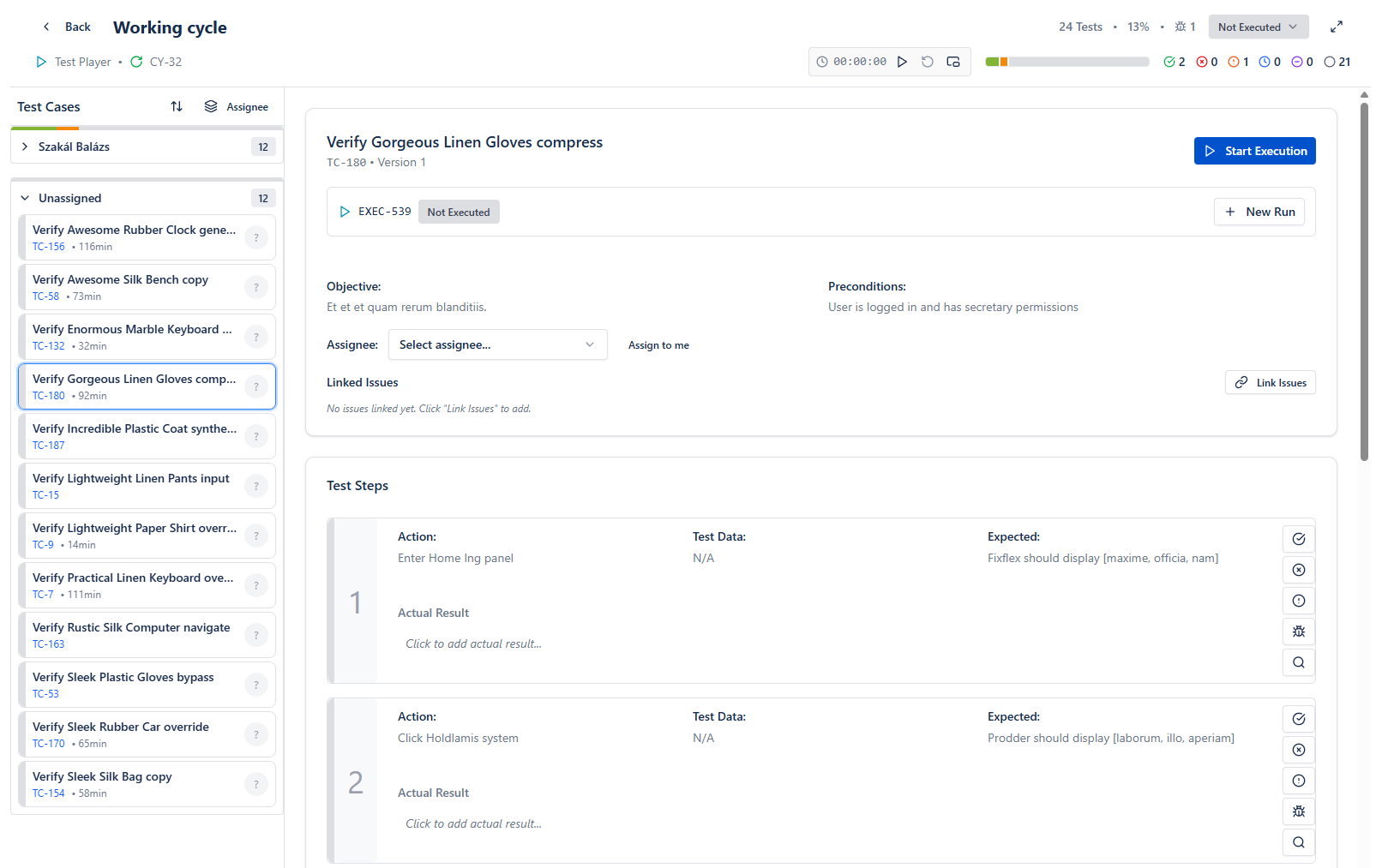
The Test Player guides business users step by step and records pass/fail results in Jira
Live preview - this is the real BesTest UI
Free for teams up to 10 users. Installs in under a minute.
Get StartedKey Benefits
How to Implement
Enable BesTest on the Project
One click in project settings, about a minute. BesTest appears in the global Apps menu and the project menu bar at the top - stakeholders find it where they already work, not in a separate tab.
Turn Acceptance Criteria into Tests
On the story's work item, use Create in bulk to turn each acceptance criterion into a requirement or test case - one per line, linked to the story automatically. Write plain-language steps, and the requirement's Coverage card shows "N linked of T needed" as you link.
Get Stakeholder Review
Send requirements and test cases through the built-in review workflow. Business owners confirm the steps match their expectations before anyone executes - cheap to fix now, expensive later.
Create a UAT Cycle and Assign Business Testers
Add the approved test cases (or the requirements, and their test cases come along) to a UAT cycle and assign each run. When the cycle is set to Ready to Execute, every tester is notified and finds their tests under My work.
Build the UAT Dashboard, Then Sign Off
Add BesTest gadgets to a Jira dashboard - execution status, pass-rate gauge and defect summary scoped to the UAT cycle, the Requirement Coverage Matrix for the UAT requirements folder. When requirements are validated, export the reports as PDF and record the sign-off.
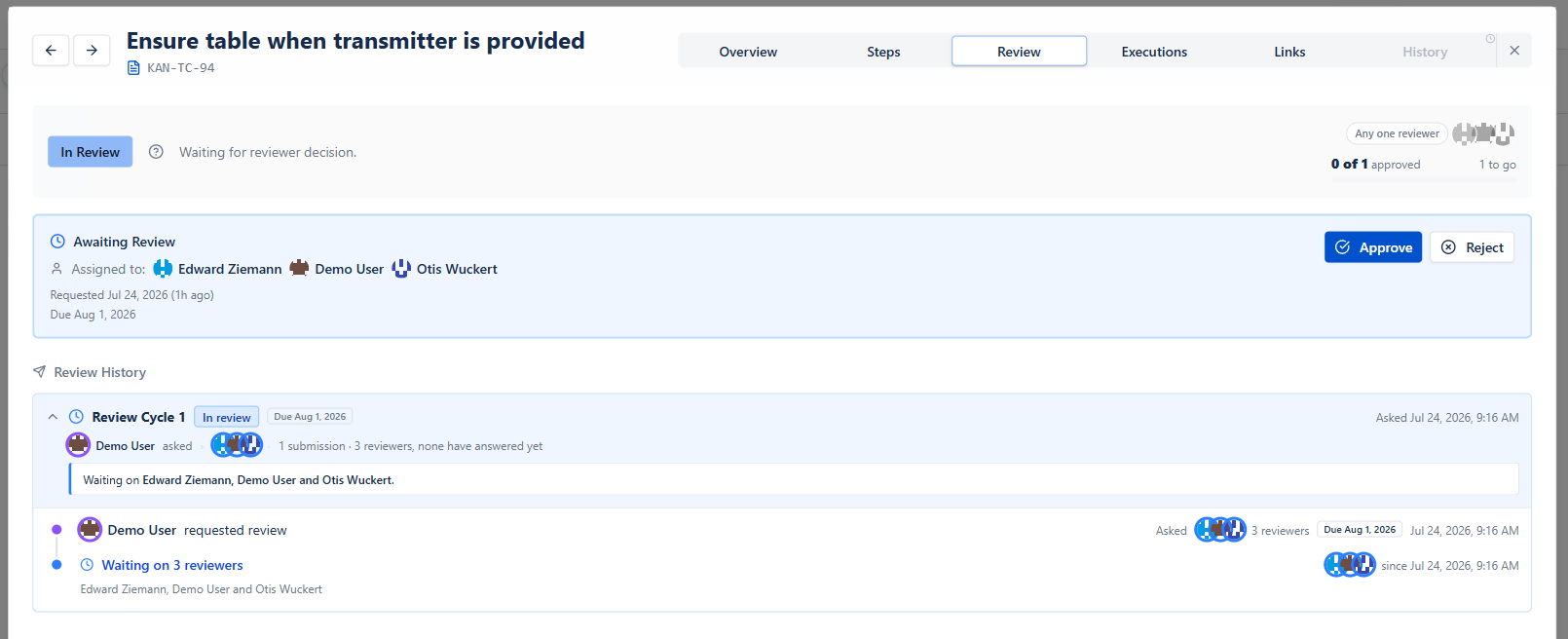
Stakeholders review and approve UAT test cases before execution begins
Best Practices
- •Keep UAT cycles short and focused - 20 to 40 runs per stakeholder beats a 200-test marathon nobody finishes
- •Write steps a first-time user can follow; if a step needs explaining in a meeting, rewrite the step
- •Add the UAT gadgets to the project dashboard before testing starts, so managers self-serve status instead of interrupting testers
- •When a step fails, capture evidence screenshots on the linked Jira issue - combined with the pre-filled steps, developers get everything they need
- •Agree the sign-off criteria up front (pass rate, open defects, requirement coverage) so the dashboard answers "are we done?" without a debate
Ready to Improve Your User Acceptance Testing (UAT)?
Start running User Acceptance Testing (UAT) cycles in Jira today. Free for up to 10 users.
Try BesTest FreeRelated Use Cases
Related Guides & Definitions
UAT in Jira: How to Run User Acceptance Testing the Right Way
User Acceptance Testing (UAT) is the final quality gate before release, but running UAT in Jira is notoriously painful without the right setup. This guide walks you through everything - from planning UAT cycles and writing business-friendly test cases to tracking stakeholder sign-off and reporting results. Learn how to turn Jira into a UAT powerhouse.
UAT Sign-Off: What It Means, Template, Emails and Checklist
UAT sign-off is the written approval from business stakeholders that a release passed user acceptance testing and can go live. This guide explains what it means and who signs, then gives you a complete UAT sign-off template, a filled-in example, three ready-to-send emails, and a checklist covering pre-UAT, during-UAT, and post-UAT phases.
UAT Test Plan Generator
Answer a form, get a complete UAT test plan: scope, entry and exit criteria, schedule, roles, scenarios, defect process, risks, and sign-off. Export to Word, Markdown, or PDF.
UAT Sign-off Sheet Generator
Generate a formal UAT sign-off document: results summary, acceptance criteria, defect dispositions, decision, and stakeholder signature blocks. Print it or export Word/Markdown.
User Acceptance Testing (UAT)
User Acceptance Testing (UAT) is the final verification phase where business users - not the QA team - run real-world scenarios against finished software and formally sign off that it is ready for release.
Acceptance Criteria
The specific conditions a feature or user story must meet to be accepted by stakeholders.