
Why Requirements Management in Jira Is Challenging
Jira has issues, stories, epics, tasks, and bugs. It does not have a "requirement". There is no entity you can query for coverage status, no built-in trace from requirement to test case to defect, and no report that answers "which requirements are fully tested?" - because nothing in Jira's data model knows what a requirement is.
There are four realistic ways to deal with that, and this guide covers all of them:
- 1Native Jira - stories and epics double as requirements. Free, zero setup, no coverage tracking.
- 2Confluence + Jira - specs live in Confluence, linked to Jira issues. Great documents, manual traceability.
- 3A dedicated requirements plugin - real requirement entities inside Jira, linked to test cases, with calculated coverage. The approach we recommend for most teams (and what BesTest provides).
- 4External RM tools + Jira sync - DOORS, Polarion, Helix RM. Industrial-grade, for regulated industries with thousands of requirements.
Teams that skip this decision end up improvising with labels, custom fields, naming conventions, and spreadsheets - and discover the gap the first time a release decision depends on knowing what was actually tested.
| What Jira Has | What Requirements Management Needs |
|---|---|
| Stories and epics | Formal requirement entities with metadata |
| Issue links | Bidirectional traceability with coverage tracking |
| Custom fields | Structured attributes (significance, complexity, impact) |
| Dashboards | Coverage reports and gap analysis |
| JQL search | Requirements filtering by coverage status |
The next section covers when each approach is enough and the specific point where it breaks.
4 Approaches to Requirements in Jira
The right approach depends on team size, regulatory exposure, and how often someone actually asks for coverage evidence. Here are the four options, ranked from simplest to most capable - with the specific point where each one breaks.
Approach 1: Native Jira (Stories and Epics as Requirements)
Epics stand in for features, stories stand in for individual requirements, acceptance criteria define "done", and issue links connect stories to test tasks. It is free, needs no setup, and every Jira user already knows how it works.
The breaking points are equally specific: acceptance criteria are unstructured text, so nothing can be calculated from them; requirements and development tasks share one backlog, so "the requirement" and "the work to build it" blur into the same ticket; and issue links carry no semantics, so Jira cannot distinguish "tested by" from "relates to".
Works for teams shipping under ~20 stories per sprint with no audit requirements and no dedicated QA. Falls apart the first time someone asks "which tests cover this requirement?" and the answer lives in six labels, a naming convention, and a spreadsheet nobody has updated since the last release.
Approach 2: Confluence + Jira
Write requirements in Confluence (a PRD or specification page), link the page to Jira issues with macros, and track test status in separate issues or spreadsheets.
Pros: Better documentation, rich formatting and diagrams, familiar to product managers
Cons: Traceability is manual and fragile, links break when pages are restructured, no automated coverage reporting, two tools to maintain
Works when the document itself is the deliverable: discovery, stakeholder sign-off, agency handovers. Breaks the first time a requirement changes after test cases exist - someone has to remember to update the page and re-check every linked issue, and no report fires when they forget.
Approach 3: Dedicated Requirements Plugin (Recommended)
Use a Jira plugin that adds a proper requirements module with:
- •Dedicated requirement entities (separate from Jira issues)
- •Linking requirements to test cases
- •Automated coverage calculation based on significance
- •Traceability views and reporting
- •Links back to the Jira stories and epics each requirement came from
Pros: Full traceability, coverage tracking, no issue bloat in your Jira backlog, built for the purpose
Cons: Requires a plugin (though many are free for small teams)
The right default for any team that has to answer "are we done testing?" with data rather than a shrug - typically 5 to a few hundred people. Requirements live in a purpose-built module, linked to Jira issues and test cases, with coverage calculated for you. This is what BesTest provides: a built-in requirements module directly within Jira, built on Atlassian Forge, with requirements stored in a dedicated database rather than as Jira issues.
Approach 4: External Tools (DOORS, Polarion, Helix RM) + Jira Sync
Requirements live in a specialized external tool, and a sync connector pushes or pulls data between it and Jira. Test management may live in yet another tool.
Pros: Industrial-grade requirements management, deep regulatory compliance features, handles thousands of requirements
Cons: Expensive (often $100+/user/month), complex integration, context switching, sync conflicts, significant setup effort
Justified when a regulator can demand your traceability evidence by name - DO-178C, IEC 62304, ISO 26262 - and you manage thousands of requirements across hardware and software. If your compliance bar is "an auditor may review our test records", a Jira plugin clears it at a fraction of the cost.
How to Add Requirements in Jira: Step by Step
Here is a practical walkthrough using a dedicated plugin. The example uses BesTest, but the concepts apply to any requirements tool.
Enable BesTest on Your Project
A project admin switches BesTest on in one click from the project settings; it takes about a minute. After that, open BesTest from the project's menu bar at the top (or from the global Apps menu) and the Requirements tab is ready. There is nothing else to configure.
Create Your First Requirement
Each requirement in BesTest is its own record with structured fields:
Name:        Invoice PDF generation supports all tax formats
Description: The system must generate PDF invoices that correctly
             display tax calculations for VAT, GST, and sales tax
             formats based on the customer's region.
Impact:      High
Complexity:  Medium
Significance: High (set from impact and complexity)
The two inputs that matter most for testing:
- •Impact - how much it hurts the business if this breaks (Low / Medium / High)
- •Complexity - how hard it is to build (Low / Medium / High)
BesTest turns the pair into a significance of Low, Medium, High or Critical. High complexity with high impact is Critical; low with low is Low. Significance decides how many linked test cases the requirement needs before it counts as covered.
Writing up a whole feature? Open the menu next to Add Requirement and choose Create in bulk: one requirement name per line, with the shared fields (folder, owner, type, impact, complexity) set once.
Connect Requirements to Your Existing Jira Issues
Your stories and epics stay where they are. BesTest adds the requirements layer on top:
- 1Open a Jira work item. The BesTest panel on it lets you create requirements (one by one or in bulk) that are linked to that work item from the start, or link requirements that already exist.
- 2From the requirement's side, the Traceability card on its Overview shows the linked work items, and Add Existing links more.
- 3Coming from a spreadsheet or a custom issue type? Requirements can be imported from CSV.
Link Requirements to Test Cases
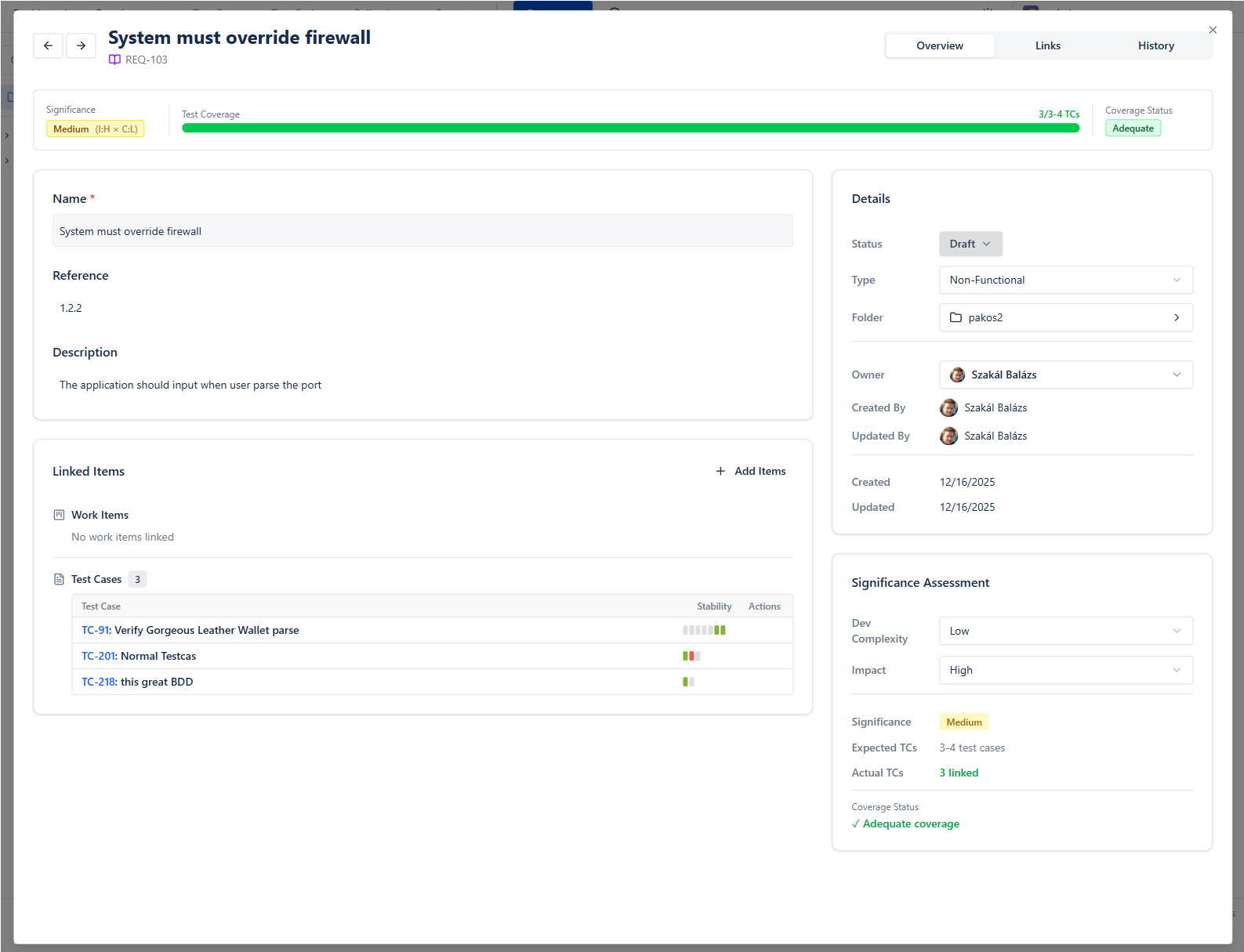
The same Traceability card lists the test cases that verify the requirement, with their recent runs. Use Create & Link to write new test cases already linked (several at once if you like, one name per line), or Add Existing to pick ones you have. The Links tab shows every connection in one list.
Next to it, the Coverage card does the math: impact, complexity, significance, and a row such as Test cases: 3 linked of 5 needed. It updates the moment you link or unlink a test case.
Review Coverage
Every requirement gets one of three coverage values, and the same value shows in the catalog, filters, reports and dashboard gadgets:
- •Covered - the linked test cases reach the target for its significance (Critical 8, High 5, Medium 3, Low 1)
- •Partly covered - some test cases are linked, but fewer than the target
- •Not covered - no linked test cases at all
When the team knows better than the count, a person can override it: the Decision control on the Coverage card switches between Automatic, Covered and Not covered, and a hand icon marks a value a person decided.
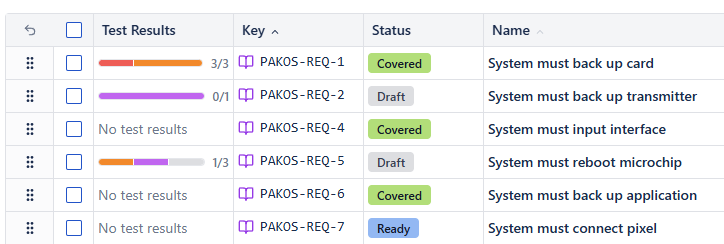
This is fundamentally different from "has a linked test case" tracking. A Critical requirement needs more testing than a Low one, and the coverage value reflects that. Filter the catalog by Coverage to list the gaps, or by Coverage set by to review every decision a person made.
Want to click through this before installing anything? The live demo runs the real app with sample data: open a requirement, link a test case, and watch the Coverage card count up.
Requirements Structure and Hierarchy
How you organize requirements matters as much as what you write. Here are three common structures, each suited to different team sizes and project types.
Structure 1: Flat List
REQ-001: User can log in with email and password
REQ-002: User can reset forgotten password via email
REQ-003: User can enable two-factor authentication
REQ-004: Admin can deactivate user accounts
REQ-005: System locks account after 5 failed login attempts
Best for: Small projects with fewer than 50 requirements. Simple to manage, easy to search. No hierarchy to maintain.
Structure 2: Grouped by Feature or Module
Authentication Module
  ├── REQ-001: User can log in with email and password
  ├── REQ-002: User can reset forgotten password
  └── REQ-003: User can enable two-factor authentication

User Management Module
  ├── REQ-004: Admin can deactivate user accounts
  ├── REQ-005: Admin can assign roles to users
  └── REQ-006: System locks account after 5 failed attempts

Billing Module
  ├── REQ-007: User can view invoice history
  ├── REQ-008: User can download invoices as PDF
  └── REQ-009: Admin can generate manual invoices
Best for: Medium projects with 50-500 requirements. Groups requirements logically, making it easier to assess coverage per module.
Structure 3: Hierarchical (Epics > Features > Requirements)
Epic: Secure Access Control
  Feature: Authentication
    ├── REQ-001: Email/password login
    ├── REQ-002: Password reset flow
    └── REQ-003: Two-factor authentication
  Feature: Authorization
    ├── REQ-004: Role-based access control
    ├── REQ-005: Permission inheritance
    └── REQ-006: API key authentication
Best for: Large projects, regulated industries, or organizations that need to map business goals down to testable requirements. Mirrors the structure of a formal requirements specification.
Practical Tips for Requirement Organization:
| Tip | Why It Matters |
|---|---|
| Use consistent naming conventions | Makes search and filtering reliable |
| Keep requirements atomic | One testable statement per requirement - not "the system should do X and Y and Z" |
| Write requirements as testable statements | If you cannot write a test case for it, it is not a good requirement |
| Assign significance early | Coverage metrics only work if significance is set before test planning |
| Review and refine regularly | Requirements change - stale requirements create false coverage metrics |
Bad: "The system should be fast"
Good: "Search results load within 2 seconds for queries returning up to 1,000 results"
Bad: "The UI should be user-friendly"
Good: "A new user can complete the checkout process without help within 3 minutes"
If the requirement does not have a clear pass/fail condition, it is not testable - and untestable requirements cannot be meaningfully covered.
Linking Requirements to Test Cases
The real value of managing requirements in Jira comes when you connect them to test cases. This linkage creates requirements traceability - the ability to trace every requirement to the tests that validate it, and every test back to the requirement it covers. (If you have not set up the test management side yet, start with our test management in Jira guide and come back.)
Why Linking Matters:
- •Coverage visibility - instantly see which requirements have no tests
- •Impact analysis - when a requirement changes, know exactly which tests need updating
- •Audit compliance - prove that every requirement was tested and by whom
- •Release confidence - ship only when coverage thresholds are met
How Linking Works in Practice:
Every entity in BesTest has a Links tab where you can view and add connections to other entities:
- 1Requirement to Test Case - the primary link. Shows which tests validate this requirement.
- 2Requirement to Jira Issue - connects the formal requirement to the story or epic it originated from
- 3Test Case to Jira Issue - links tests to bugs or tasks for evidence and defect tracking
Here is what the invoice requirement from Step 2 looks like once four test cases are linked:
Requirement:  Invoice PDF generation supports all tax formats
Significance: High (impact High x complexity Medium)
Test cases:   4 linked of 5 needed
Coverage:     Partly covered   (Decision: Automatic)

Linked test cases (latest result):
  TC-045: Verify VAT calculation on PDF invoice .......... Passed
  TC-046: Verify GST calculation on PDF invoice .......... Passed
  TC-047: Verify sales tax calculation on PDF invoice .... Passed
  TC-048: Verify tax-exempt invoice generation ........... Not Run
Four tests feel like plenty, but a High requirement needs five. A fifth test case (say, rounding on mixed-rate invoices) moves it to Covered. If the team agrees four really is enough, someone sets Decision to Covered instead, and the hand icon records that a person made that call.
The Significance-Based Coverage Model:
This is a critical distinction. BesTest does not simply check "does this requirement have at least one linked test case?" Coverage is measured against significance:
- •Significance comes from impact and complexity - high complexity with high impact is Critical, low with low is Low
- •A Critical requirement needs eight linked test cases to count as Covered, a High one five, a Medium one three
- •A Low requirement is covered by a single test case
This stops teams from gaming the metric by linking one trivial test to each requirement and calling it "100% covered."
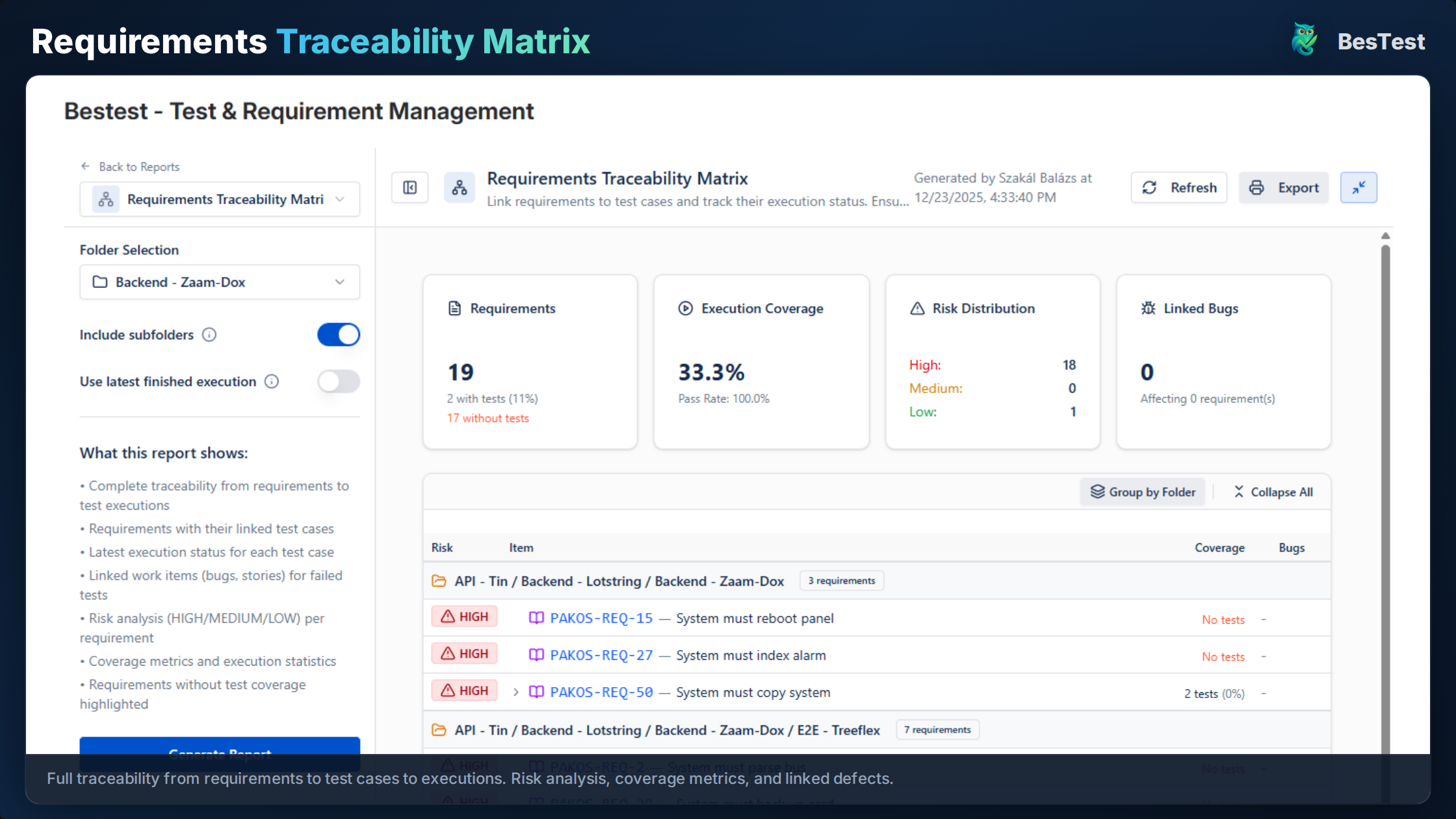
For a deeper dive into building and maintaining a full traceability matrix, see our Requirements Traceability Matrix guide. If you want the matrix shape for your own requirement list first, the free RTM generator builds one in the browser and flags the gaps.
Requirements Coverage and Reporting
Coverage reporting answers the question every stakeholder asks before a release: "Are we done testing?"
Without a coverage report, the answer is a guess. With one, it is data.
Key Coverage Metrics:
| Metric | What It Tells You | Target |
|---|---|---|
| Overall coverage % | Share of requirements with enough tests for their significance | 90%+ for critical releases |
| Not covered | Requirements with zero linked test cases | 0 for regulated projects |
| Partly covered | Requirements with some tests, but fewer than their significance needs | Review before release |
| Pass rate | Percentage of linked tests that have passed | 95%+ for production readiness |
| Execution progress | How many linked tests have been run vs. total | 100% before sign-off |
Building a Coverage Dashboard:
BesTest ships Jira dashboard gadgets that use the same Covered / Partly covered / Not covered value as the requirement itself:
- •Requirements Coverage Breakdown - requirements by coverage, with a bar of test results per requirement
- •Significance Coverage Matrix - significance against coverage, so a Critical requirement that is only Partly covered sits in the top row where nobody can miss it
- •Coverage Treemap by Folder - which modules or features are under-tested
- •Requirements Coverage Heatmap - requirements against test cases, colored by the latest result
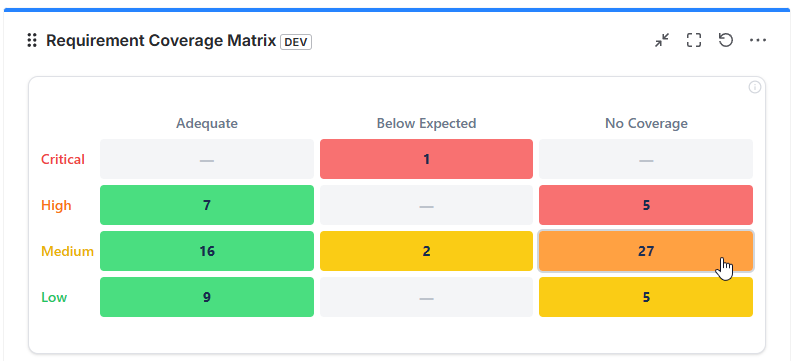
For a release, two reports go one level deeper: the Requirements Traceability Matrix rates each requirement's risk (High, Medium or Low) from its linked tests, how many of them ran and how many passed, and lists the bugs linked to failures, while Work Item Traceability rolls the same signals up for an epic or story, so you can ask "is this epic ready to ship?" without building anything.
This visibility matters for several audiences:
- •QA leads use it to plan test effort and allocate resources
- •Product owners use it to understand what is validated and what is not
- •Release managers use it as a go/no-go criterion
- •Auditors use it as compliance evidence
Using Coverage for Release Decisions:
A practical release readiness checklist based on requirements coverage:
Release Readiness Checklist:
[x] Every Critical and High requirement is Covered
[x] No requirement is Not covered (or a person decided why)
[x] Pass rate for linked test cases > 95%
[x] All failed test cases have linked defects
[x] All blocking defects are resolved
[ ] Stakeholder sign-off obtained90% coverage sounds good, but it is meaningless if the 10% uncovered requirements include your most critical business logic. Always weight coverage by significance. BesTest does this for you: a Critical requirement needs eight linked test cases before it counts as Covered, and the Significance Coverage Matrix puts Critical gaps in the top row.
Live preview - this is the real BesTest UI
Every workaround above fails the same way.
Labels, custom issue types, epics, a Confluence page: each one can hold a requirement, and none of them can tell you whether it is tested, because Jira has no requirement type and nothing to compute coverage against. BesTest adds one, with significance derived from development complexity and impact, so "covered" means covered enough for what the requirement is actually worth. It is a Jira app rather than a separate tool - free for up to 10 users, about a minute to switch on.
View on the Atlassian MarketplaceJira vs. Confluence for Requirements: Which Should You Use?
This is one of the most common questions teams ask: should requirements live in Jira, in Confluence, or somewhere else? The answer depends on what you need from your requirements.
Confluence for Requirements:
Confluence excels at documentation - writing, formatting, and sharing long-form specifications:
- •Product Requirements Documents (PRDs)
- •Feature specifications with diagrams and mockups
- •Business requirements with context and rationale
- •Stakeholder-facing documents that need rich formatting
Confluence Strengths:
+ Rich text editing with tables, images, diagrams
+ Page hierarchy for organizing specs
+ Easy sharing with non-technical stakeholders
+ Commenting and review workflows
+ Templates for PRDs and specs

Confluence Weaknesses:
- No traceability to test cases or defects
- Requirements are embedded in page text, not structured data
- No coverage metrics
- Manual linking to Jira issues (links break when pages move)
- No way to query "show me all untested requirements"
Jira for Requirements:
Jira (with plugins) excels at tracking and traceability - managing requirements as structured data with links to tests and defects:
Jira + Plugin Strengths:
+ Requirements are structured data with fields and metadata
+ Direct linking to test cases and Jira issues
+ Automated coverage calculation
+ Queryable (filter by status, significance, coverage)
+ Single tool for requirements, tests, and defects

Jira + Plugin Weaknesses:
- Less suitable for long-form documentation
- Not ideal for early-stage brainstorming or diagramming
- Stakeholders need Jira access
The Practical Answer: Use Both
The best teams use Confluence and Jira together, each for what it does best:
| Phase | Tool | Purpose |
|---|---|---|
| Discovery and planning | Confluence | PRDs, feature specs, user research, diagrams |
| Requirement definition | Jira plugin (e.g., BesTest) | Formal, testable requirement statements |
| Test planning | Jira plugin | Link requirements to test cases, plan coverage |
| Execution and tracking | Jira plugin | Execute tests, track coverage, report status |
| Stakeholder review | Confluence + Jira dashboard | Specs in Confluence, coverage dashboards in Jira |
The key is knowing when to transition: once a requirement moves from "being discussed" to "needs to be tested," it should exist as a structured, trackable entity in Jira - not just a paragraph in a Confluence page.
A common mistake is maintaining requirements in both Confluence and Jira and trying to keep them in sync. This creates a maintenance burden that nobody sustains. Pick one system of record for each requirement's lifecycle stage, and make the hand-off clean.
Jira Requirements Management Best Practices
These nine practices separate teams that manage requirements effectively from teams that struggle.
Define "Requirement" for Your Team
Before anything else, agree on what counts as a requirement. For some teams, a Jira story is a requirement. For others, requirements are formal statements that stories implement. Define this clearly so everyone uses the same language.
Keep Requirements Separate from Development Tasks
Requirements describe what the system should do. Tasks and stories describe how to build it. Mixing them in the same backlog creates confusion. Use a dedicated requirements module (like BesTest) or at minimum, a dedicated issue type.
Write Atomic, Testable Requirements
Each requirement should describe one testable behavior:
- •Atomic: one statement per requirement, not compound
- •Testable: has a clear pass/fail criterion
- •Independent: can be validated without depending on another requirement's state
- •Unambiguous: means the same thing to every reader
Set Significance Before Writing Test Cases
Coverage metrics only work if significance is assigned before test planning. Otherwise, teams write the same number of tests for trivial features and critical ones. Set impact and complexity as soon as the requirement is created.
Review and Approve Requirements Before They Are Built
Before a requirement goes into development, someone other than its author should check it:
- •Is it clear enough for a developer to implement and a tester to validate?
- •Does the team agree on the acceptance criteria?
- •Is the significance rating still right?
In BesTest, requirements use the same review and approval workflow as test cases: send a requirement to one or more reviewers, and it moves from Draft to In Review to Approved (or Changes Requested), with every round kept in the review audit trail. The approval state shows in the requirement's stats bar, so nobody writes tests against a spec that was never signed off.
Link Early, Link Often
Create links between requirements, test cases, and Jira issues as soon as they exist - not after the sprint ends. Late linking means gaps go unnoticed until it is too late.
Use Coverage Gaps to Drive Test Planning
Instead of writing tests based on what is easy or familiar, start each sprint from the gap list: filter requirements to Not covered and Partly covered, and work through the Critical and High ones first.
Keep Requirements Out of the Issue Count
A custom Jira issue type for requirements seems logical but clutters backlogs and queries at scale (the next section covers the trade-offs). A dedicated module keeps requirements as their own records, linked to the Jira issues they relate to, without adding to your issue count.
Establish Traceability as a Team Habit
Traceability is not a one-time setup - it is an ongoing practice. Make it part of your Definition of Done: "requirement is linked to test cases" should be as non-negotiable as "code is peer-reviewed."
Read each requirement and ask: could someone who just joined the team write a test case for this requirement without asking clarifying questions? If not, the requirement needs refinement.
Should You Create a Custom Jira Requirement Issue Type?
Many teams considering requirements management in Jira ask whether they should create a custom "Requirement" issue type. It is a reasonable idea - but it comes with trade-offs worth understanding.
How to Create a Requirement Issue Type in Jira:
- 1Go to Jira Settings > Issues > Issue Types
- 2Click "Add Issue Type"
- 3Name it "Requirement" and choose a standard type
- 4Add custom fields: Description, Priority, Dev Complexity, Impact, Status
- 5Add it to your project's issue type scheme
- 6Configure workflows for the requirement lifecycle
Jira Requirements Example Using a Custom Issue Type:
Issue Type: Requirement
Key: PROJ-REQ-001
Summary: System sends email notification when order status changes
Description: When an order transitions to "Shipped", "Delivered",
             or "Cancelled", the system must send an email to the
             customer with order details and the new status.
Priority: High
Dev Complexity: Medium
Impact: High
Status: Approved
Linked Stories: PROJ-142, PROJ-143
Linked Test Cases: (manually linked via issue links)
Why This Approach Has Limits:
While this works for small projects, it creates several problems at scale:
| Problem | Impact |
|---|---|
| Backlog pollution | Requirements mix with stories, bugs, and tasks in every board and filter |
| No coverage calculation | Jira cannot compute "is this requirement adequately tested?" |
| Manual traceability | Issue links exist, but there is no automated matrix or coverage view |
| Field sprawl | Every issue type in the project inherits requirement fields or you need complex field configurations |
| Reporting gaps | JQL can filter requirements, but cannot calculate coverage percentages |
The Better Alternative:
A dedicated requirements module (like BesTest's built-in requirements) gives you all the structure of a custom issue type without the downsides:
- •Requirements do not clutter your Jira backlog or add to your issue count
- •Coverage is calculated automatically based on significance
- •Traceability views and a review workflow are built in
- •You can still link to Jira issues for full bidirectional context
Already have a custom requirement issue type? You do not have to start over. Export the issues to CSV and import them as BesTest requirements, or open each work item and create its requirements from the BesTest panel (in bulk if you like), already linked to the original issue.
References
- •IREB, "Handbook of Requirements Engineering Fundamentals," 2022 - international standard for requirements engineering practices, covering elicitation, documentation, and management.
- •IEEE 29148:2018, "Systems and Software Engineering - Life Cycle Processes - Requirements Engineering" - defines requirements engineering processes across the system and software lifecycle.
- •ISTQB Foundation Level Syllabus v4.0, 2023 - Section 1.4 on traceability between test basis (including requirements) and test cases.
- •Atlassian, "Jira Issue Types," Atlassian Documentation - official documentation on Jira issue types and their intended use.
- •Karl Wiegers & Joy Beatty, "Software Requirements," 3rd Edition, Microsoft Press, 2013 - industry-standard reference on writing, organizing, and managing software requirements.
Frequently Asked Questions
How do I manage requirements in Jira?
You have four main options: (1) use native Jira stories and epics as requirements - simple but limited; (2) write requirements in Confluence and link to Jira issues - better documentation but manual traceability; (3) use a dedicated Jira requirements plugin like BesTest that provides structured requirements with automated coverage tracking; (4) use external tools like DOORS or Polarion with Jira sync - enterprise-grade but complex. For most teams, a dedicated plugin offers the best balance of capability and simplicity.
How do I add requirements in Jira?
With a dedicated requirements plugin like BesTest, you create requirements directly in the plugin's requirements module - not as Jira issues. Each requirement has structured fields including name, description, impact and complexity. You can create many at once (one name per line), create them from the BesTest panel on a Jira story so they are linked from the start, or import them from CSV. Without a plugin, the simplest approach is to create a custom "Requirement" issue type, though this has limitations around coverage tracking and backlog clutter.
How do I track requirements in Jira?
Native Jira offers basic tracking through issue statuses and JQL filters, but cannot calculate coverage metrics. For proper requirements tracking, use a dedicated plugin that provides: a coverage value per requirement (in BesTest: Covered, Partly covered or Not covered), significance-based coverage calculation, traceability from requirements to test cases and defects, and dashboard gadgets showing real-time coverage status.
How do I create requirements in Jira?
There are two approaches: (1) Create a custom issue type called "Requirement" with fields for priority, complexity, and impact - this works but clutters your backlog. (2) Use a Jira plugin with a built-in requirements module where requirements are stored separately from Jira issues. The second approach lets you create requirements with structured fields and automatic significance calculation, while keeping your Jira backlog clean.
Should I use Jira or Confluence for requirements?
Use both, each for what it does best. Confluence is ideal for early-stage documentation: PRDs, feature specs, and stakeholder-facing documents with rich formatting. Jira (with a requirements plugin) is ideal for structured, testable requirements that need traceability to test cases and defects. Write your specs in Confluence during discovery, then create formal, trackable requirements in Jira once they are ready for development and testing.
What is the best Jira requirements management plugin?
Look for a plugin that provides: dedicated requirement entities (not just Jira issue types), significance-based coverage calculation, bidirectional traceability to test cases, Jira dashboard integration, and a secure platform. BesTest offers all of these with a built-in requirements module on Atlassian Forge, free for up to 10 users. The key differentiator is coverage that accounts for requirement significance - not just whether a test case is linked.
Can I create a requirements traceability matrix in Jira?
Native Jira has no built-in traceability matrix. You can approximate one using JQL and issue links, but this requires manual maintenance and cannot calculate coverage metrics. Dedicated plugins like BesTest generate traceability automatically by linking requirements to test cases, executions, and defects. For a complete guide on building and maintaining an RTM, see our Requirements Traceability Matrix guide.
Every workaround above fails the same way.
Labels, custom issue types, epics, a Confluence page: each one can hold a requirement, and none of them can tell you whether it is tested, because Jira has no requirement type and nothing to compute coverage against. BesTest adds one, with significance derived from development complexity and impact, so "covered" means covered enough for what the requirement is actually worth. It is a Jira app rather than a separate tool - free for up to 10 users, about a minute to switch on.
View on the Atlassian Marketplace
Balázs Szakál
Founder & QA Lead at BesTest
Founder of BesTest and QA professional with extensive experience in software testing, test management, and Jira administration. Built BesTest to give testing teams complete visibility from requirements to release.
More about the team →