
Jira and Testing: The State of Things
Jira tracks issues brilliantly and tests not at all. There is no test case entity, no execution tracking, no coverage reporting, no test cycles - so every Jira team ends up answering the same question: where do our test cases live? The answer you pick shapes your testing process for years.
In practice, teams answer it one of three ways:
- 1Bend native Jira into a test repository with custom issue types and fields
- 2Run spreadsheets next to Jira and link them by hand
- 3Install a dedicated test management tool from the Atlassian Marketplace
This guide covers all three: what each looks like in practice, the point at which it breaks, and how to set up the dedicated-tool option properly - from structure and migration through execution, reporting, and scaling.
What Teams Try First (and Why It Breaks)
Before installing anything, most teams try one of two workarounds. Both work briefly; both break the same way.
Attempt 1: Native Jira issue types
Create a "Test Case" issue type, add custom fields (Test Steps, Expected Results, Preconditions, Pass/Fail), link tests to stories with "tests" / "is tested by" link types, and track cycles with labels like "Sprint-5-Regression".
This is free, keeps everything in one place, and gives you full JQL over your tests. What it does not give you: a test execution interface, real test cycles or plans, coverage reports, or execution history - re-running a test in the next cycle means overwriting last cycle's result. And every test case is now an issue cluttering your backlog, boards, and searches.
Under roughly 50 test cases and a single release stream, native Jira is fine - do not buy a tool yet. Beyond that, you will spend more time maintaining label conventions and custom fields than actually testing.
Attempt 2: Spreadsheets next to Jira
Test cases live in Excel or Google Sheets, linked to Jira by pasting issue IDs:
| TC-ID | Title | Steps | Expected | Jira Link | Sprint 5 | Sprint 6 |
|---|---|---|---|---|---|---|
| TC-001 | Valid login | 1. Go to... | User sees... | PROJ-123 | Pass | Pass |
| TC-002 | Invalid password | 1. Go to... | Error shows | PROJ-123 | Pass | Fail |
The appeal is real: everyone knows Excel, the format is flexible, and stakeholders can open it without a Jira license. The failure mode is also always the same: the sheet and Jira drift apart. Tests get edited in the sheet while the Jira links go stale, nobody knows which copy is current, defects are not linked to failures, and every status report is a copy-paste job. Based on conversations with QA teams, maintaining the sheets alone eats 2-5 hours per sprint.
A spreadsheet is acceptable for a one-off UAT round with business stakeholders who will never log into Jira. As the permanent system of record for testing, avoid it: the simplicity you buy in week one, you repay every sprint after. (If UAT is your actual problem, the UAT in Jira guide covers that workflow end to end.)
The Option That Scales: Dedicated Test Management Tools
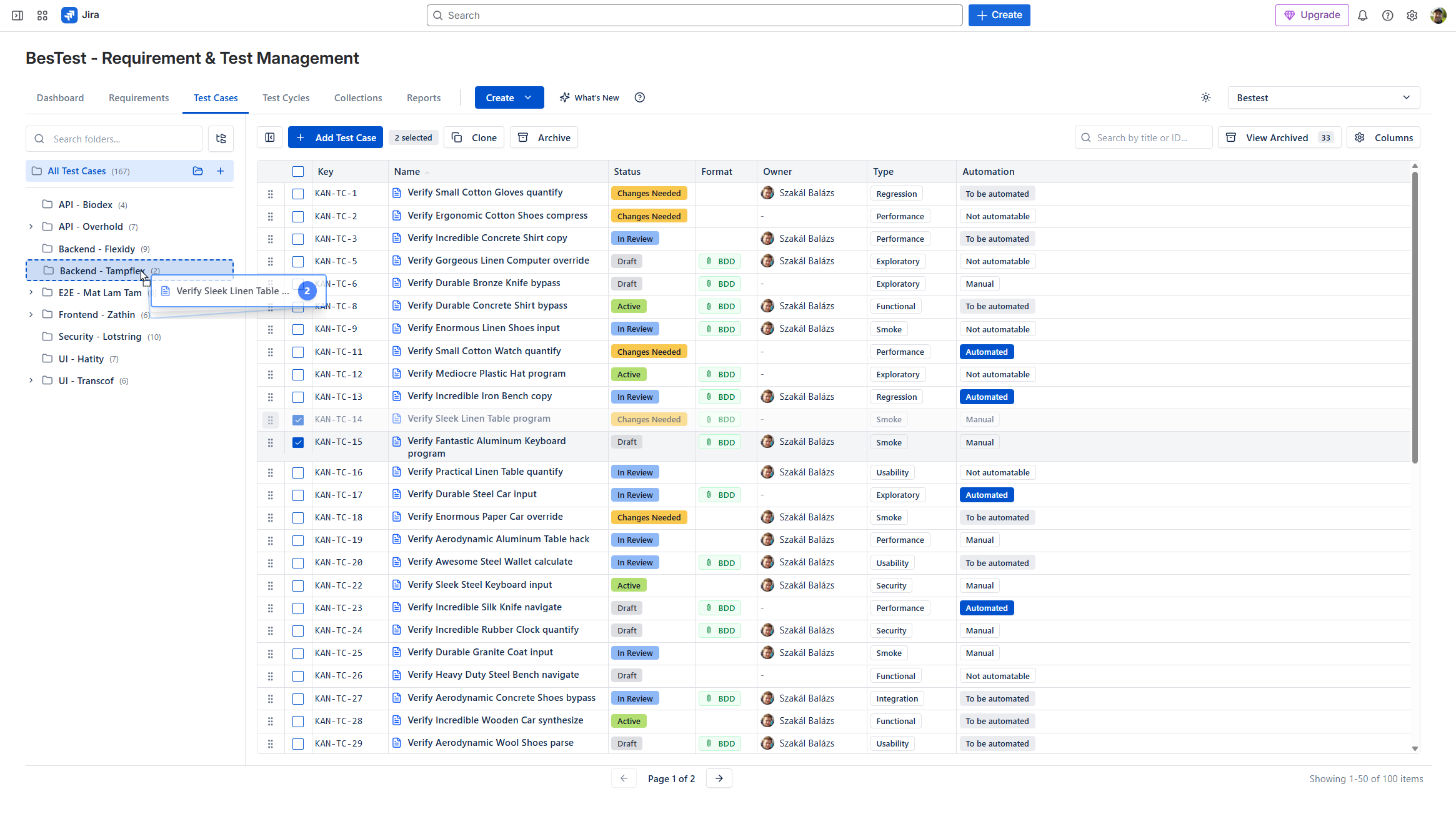
The most effective approach is using a dedicated test management tool that integrates with Jira. Here's what these tools provide:
Core Capabilities:
Test Case Management
- •Structured test case creation with steps, expected results
- •Folder organization and hierarchies
- •Review and approval before tests go live
- •Search and filtering
Test Execution
- •Test cycles / test plans for organizing execution
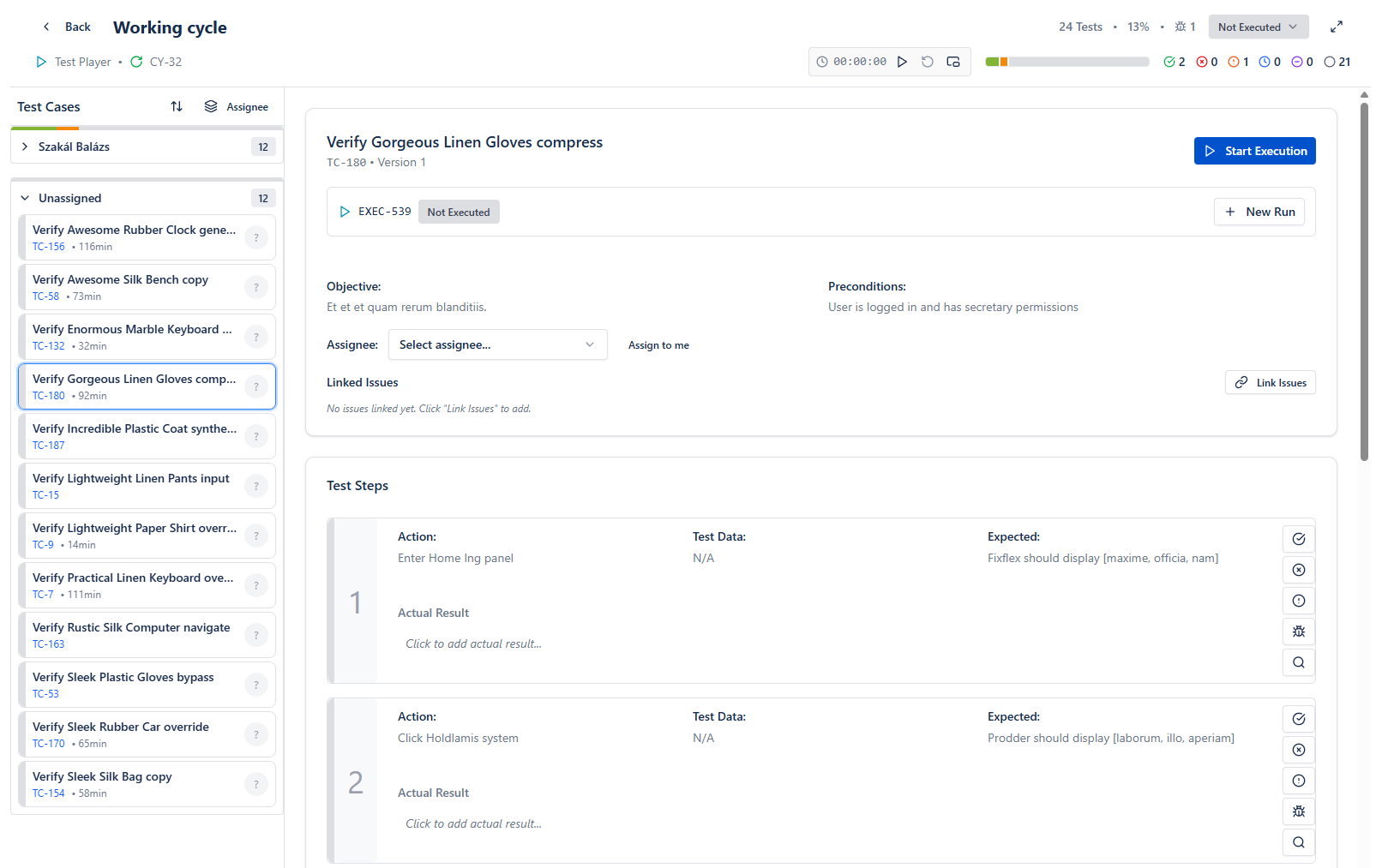
- •Dedicated test player interface
- •Status tracking (Pass/Fail/Blocked)
- •Defect logging directly from failures
Requirements Traceability
- •Link requirements to test cases
- •Coverage reports and metrics
- •Gap analysis
Reporting & Dashboards
- •Execution progress reports
- •Coverage dashboards
- •Trend analysis
- •Export capabilities
Jira Integration
- •Link test executions to Jira issues
- •Create bugs from failed tests
- •Sync status with user stories
- •Display test info in Jira
Popular Options on Atlassian Marketplace:
- •Zephyr (SmartBear)
- •Xray (Idera)
- •AIO Tests (Navarambh)
- •RTM (Deviniti)
- •BesTest
Each has different architectural approaches, pricing, and feature sets. The right choice depends on your team's specific needs - see our detailed comparison of Jira test management tools for a full breakdown.
Choosing the Right Test Management Tool
Consider these factors when selecting a test management tool for Jira:
Architecture: Where Is Test Data Stored?
| Approach | How It Works | Pros | Cons |
|---|---|---|---|
| Jira Issues | Tests stored as Jira issues | Full JQL, native Jira features | Issue bloat, performance impact |
| Separate Storage | Tests in dedicated database | Clean Jira, better performance | No JQL for tests |
Tools using Jira issues: Xray, RTM
Tools using separate storage: BesTest, Zephyr Scale
Requirements Management
| Need | Questions to Ask |
|---|---|
| Built-in requirements? | Do you need to create requirements in the test tool? |
| Link to Jira stories? | Is linking to existing Jira issues enough? |
| Coverage tracking? | How detailed does coverage reporting need to be? |
Tools with built-in requirements: BesTest, RTM
Jira-Native UI
How important is it that the tool looks like Jira?
- •Some tools have custom UIs that require learning
- •Others follow Atlassian Design System for familiarity
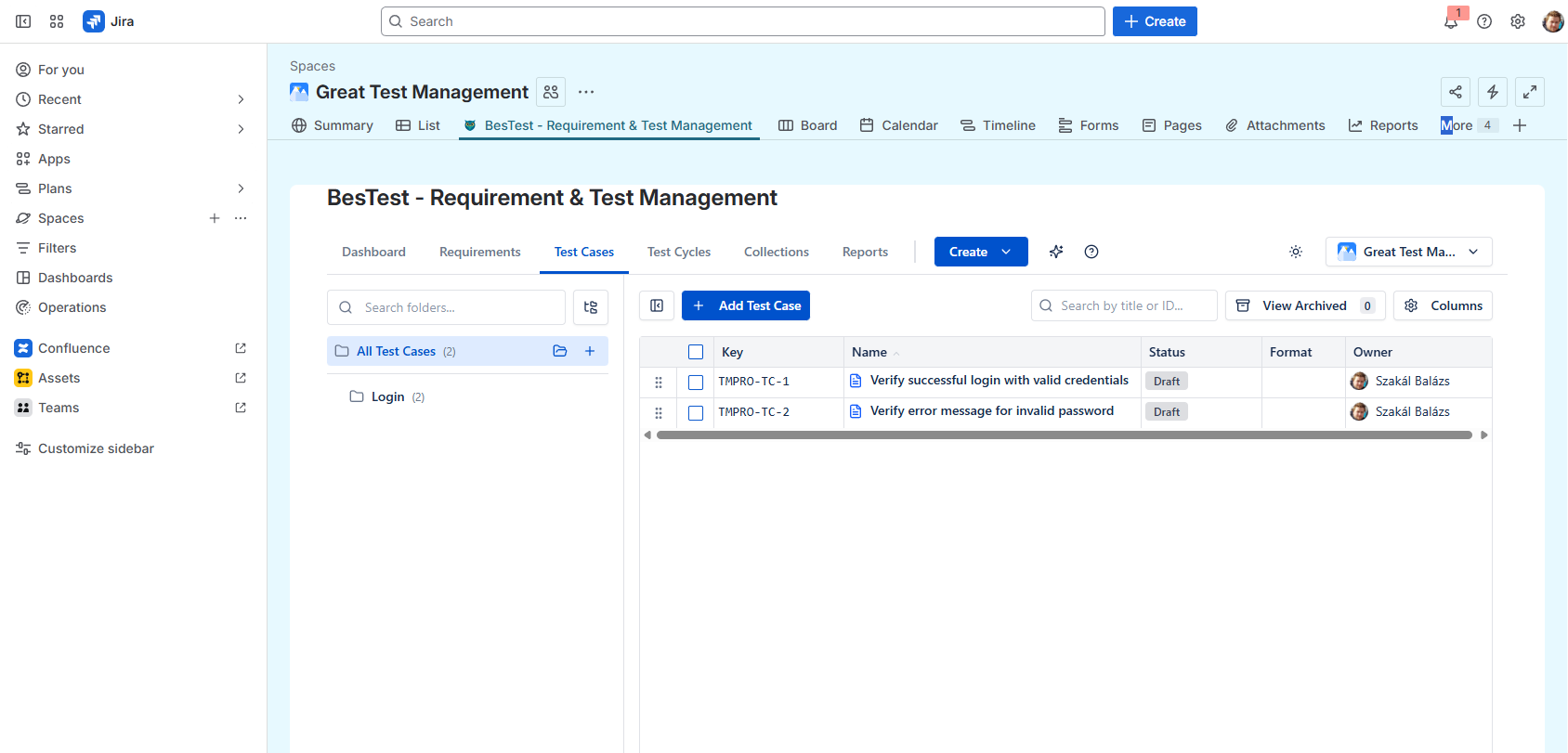
- •BesTest follows the Atlassian Design System and opens from the project's menu bar, so it feels like part of Jira
Workflow Features
| Feature | Why It Matters |
|---|---|
| Test case review | Quality gate before execution |
| Smart collections | Automatic test cycle building |
| Automation integration | CI/CD pipeline connection |
Pricing Model
Most tools use per-user pricing based on total Jira users:
- •Compare tiers carefully
- •Look for free tiers to evaluate
- •Calculate total cost at your scale
Platform and Data Residency
Ask every vendor two questions: which Atlassian app platform is the tool built on (Forge, or the older Connect), and in which region will your test data live? BesTest is built on Atlassian Forge and lets you host your data in the EU, US or India.
Recommendation Matrix:
| If you need... | Consider... |
|---|---|
| Clean Jira + requirements | BesTest |
| Heavy automation | Xray |
| Enterprise scale | Zephyr Scale |
| Budget-friendly | BesTest, AIO Tests |
Setting Up Test Management: Step by Step
Here's a practical four-week plan for implementing test management in Jira:
Week 1: Foundation
- 1Define your structure - organize test cases by feature or module (not by tester or release), agree a naming convention, and name an owner for test case maintenance.
- 2Choose your tool - shortlist two or three, and trial them on a real feature rather than a demo project. Free tiers make this cheap.
- 3Install and enable - install from the Atlassian Marketplace and switch it on for one pilot project first.
Week 2: Migration (If Applicable)
- 1Audit existing tests - where do they live today (spreadsheets, wikis, an old tool), and which are still relevant? Do not migrate obsolete tests.
- 2Import - most tools import CSV; map the columns, import a small batch, check it, then do the rest. Start with critical test cases.
- 3Establish traceability - link test cases to the requirements or stories they verify, and look at the gaps that show up.
Week 3: Process Definition
- 1Define workflows - when test cases are written (refinement, sprint planning), who reviews them, and how cycles are organized.
- 2Set a standard test case format - preconditions, numbered steps with expected results, or BDD for teams that already think in Given / When / Then. The free test case template generator gives you a starting format and a CSV you can import.
- 3Walk the team through it - testers on execution, developers on linking and bugs, stakeholders on the dashboard.
Week 4: Pilot Sprint
Run one real sprint in the new tool: execute, log defects from failures, generate the reports. Then ask what worked, what hurt and what is missing, adjust, and roll out to the next project.
Organizing Test Cycles in Jira
Test cycles group test cases for a specific testing purpose. Here's how to structure them:
Types of Test Cycles:
Regression Cycles
- •Core functionality tests
- •Run before every release
- •Should be stable and automated where possible
Sprint Cycles
- •Tests for features in current sprint
- •Typically manual or newly written
- •Focus on new functionality
Release Cycles
- •Comprehensive testing before major releases
- •Combination of regression + new features
- •Often includes non-functional testing
Smoke Cycles
- •Critical path tests only
- •Quick execution (< 1 hour)
- •Run after deployments
Organizing Strategies:
By Release
/v2.0 Release
  /Regression
  /New Features
  /Performance
/v2.1 Release
  /Regression
  /New Features
By Sprint
/Sprint 10
  /User Stories
  /Bug Fixes
  /Regression Subset
/Sprint 11
By Feature
/Login & Authentication
  /Smoke
  /Full Regression
/Dashboard
  /Smoke
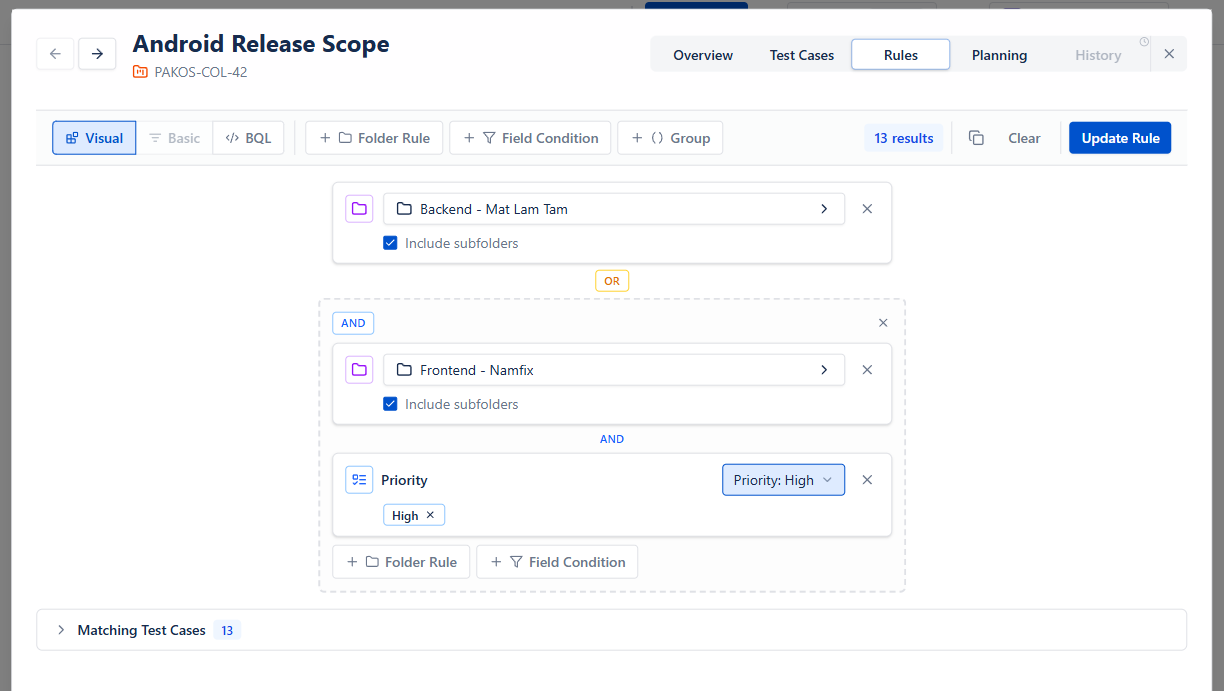
/Full RegressionInstead of hand-picking tests for every cycle, define a collection once and combine three sources:
- Rules - a folder (say Login, with its subfolders) plus field conditions such as type = "REGRESSION" AND priority IN ("CRITICAL", "HIGH")
- Requirements - add the requirements in scope, and every test case linked to them comes along
- Fixed picks - a few hand-chosen test cases on top
Rules and requirement links are evaluated again every time you add the collection to a cycle, so new matching test cases show up without anyone remembering to add them.
Live preview - this is the real BesTest UI
The four-week plan only holds if the tool stops fighting you.
Most of the setup cost above is not the tool itself, it is the configuration, training and migration stacked around it. Skipping that is the whole point of a Jira app: enable it on one project and the structure, the coverage reporting and the test cycles are already there, in an interface your team already knows how to use. Free for up to 10 users, about a minute to switch on.
View on the Atlassian MarketplaceTest Execution Workflow
A typical test execution workflow in Jira:
Create Test Cycle
- •Name: "Sprint 10 Regression"
- •Add test cases (manual selection or Smart Collection)
- •Assign testers
- •Set target dates
Execute Tests
For each test case:
- 1Open test in test player
- 2Follow steps
- 3Record actual results
- 4Mark status: Pass / Fail / Blocked
- 5Log defects for failures
In a cycle with hundreds of runs, finding the next test is half the work. BesTest's Test Player has search across keys, names and execution notes, a My work switch, a filter panel with counts (status, has bugs, tends to fail, unassigned and more), and Next to do (keyboard N) to jump to the next open test. A bug created from a failed step opens Jira's create form pre-filled with the test case, step, expected and actual result, already linked to the run. You can try all of it on a sample cycle in the live demo.
Track Progress
Monitor during execution:
- •% Complete
- •Pass rate
- •Blocker count
- •Time remaining
Triage Failures
For failed tests:
- •Is it a product bug? → Create Jira issue
- •Is it a test case issue? → Update test case
- •Is it environmental? → Mark as Blocked, investigate
Report Results
End of cycle:
- •Generate execution summary
- •Share with stakeholders
- •Archive results for history
In BesTest a cycle turns Done when every run has a result, but it does not lock: notes, linked defects and time spent can still be added, and adding new test work reopens it automatically.
Best Practices for Execution:
Don't Skip Blocked Tests
Blocked tests indicate issues. Track and resolve blockers.
Document Actual Results
Even for passing tests, note anything unexpected.
Use Evidence
Link Jira issues with screenshots, logs, or recordings for failures.
Link Defects Immediately
Create and link bugs during execution, not after.
Re-Execute Fixes
After bugs are fixed, re-run failed tests before release.
Testing Reports and Dashboards
Effective reporting communicates testing progress and quality:
Essential Reports:
Test Execution Summary
Shows current testing status:
| Status | Count | % |
|---|---|---|
| Passed | 142 | 71% |
| Failed | 18 | 9% |
| Blocked | 8 | 4% |
| Not Run | 32 | 16% |
| Total | 200 | 100% |
Requirements Coverage
Shows testing completeness:
| Coverage | Requirements |
|---|---|
| Covered | 45 |
| Partly covered | 12 |
| Not covered | 3 |
| Total | 60 |
In BesTest, "Covered" means enough linked test cases for the requirement's significance, not just one: a Critical requirement needs eight, a Low one needs one.
Defect Summary
Links testing to quality:
| Priority | Open | Fixed | Verified |
|---|---|---|---|
| Critical | 2 | 1 | 0 |
| High | 5 | 8 | 6 |
| Medium | 12 | 15 | 10 |
| Low | 8 | 12 | 8 |
Trend Analysis
Shows quality over time:
- •Pass rate by sprint
- •Defect discovery rate
- •Test case growth
- •Automation percentage
Dashboard Design Tips:
For Testers:
- •Assigned tests and status
- •Today's execution queue
- •Open blockers
- •Recent failures
For Test Leads:
- •Team progress
- •Coverage gaps
- •Defect trends
- •Risk areas
For Stakeholders:
- •Release readiness
- •Quality metrics
- •Go/no-go indicators
- •High-level trends
BesTest Dashboards:
Without building anything, BesTest gives you:
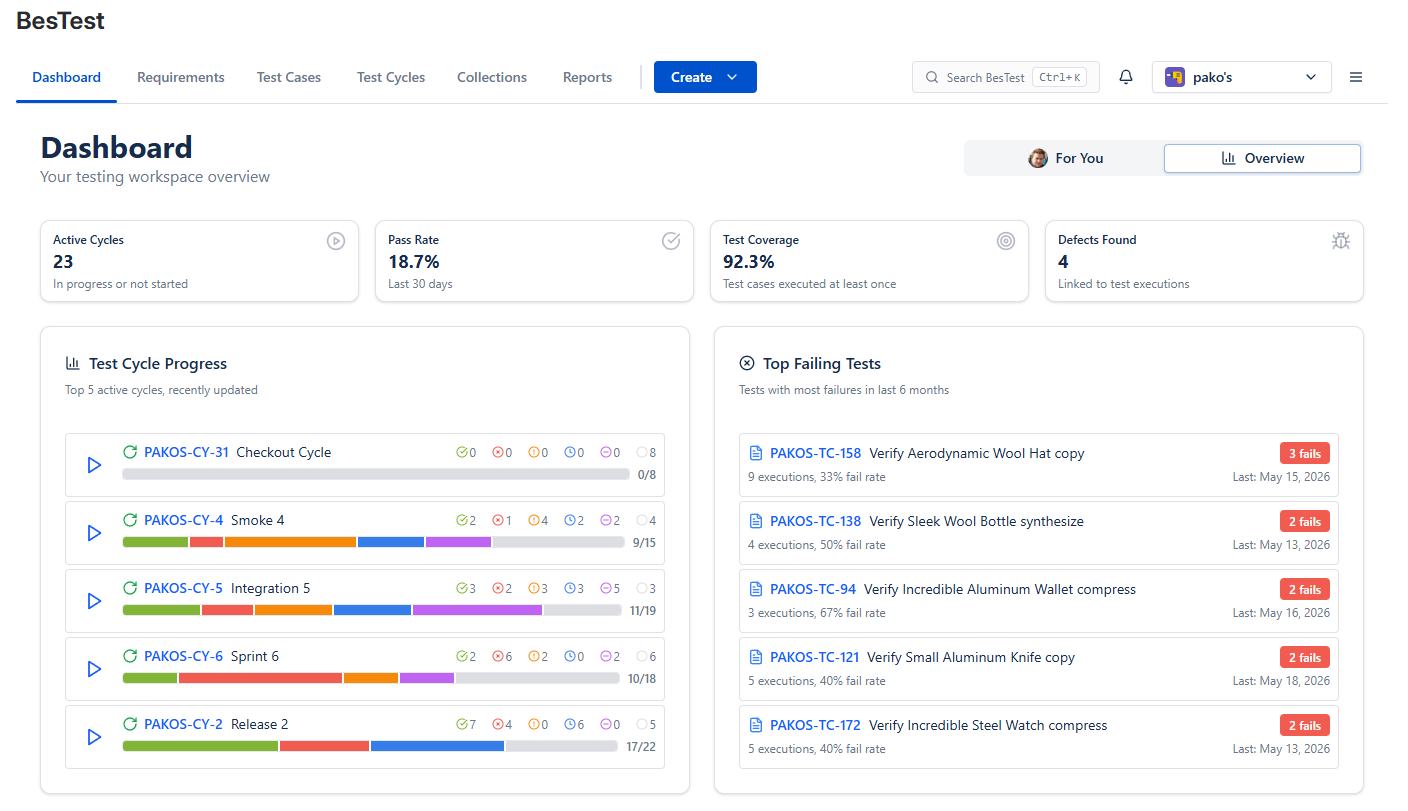
- •An in-app Dashboard with a For You view (your cycles and reviews) and an Overview (active cycles, pass rate, defects, cycle progress, top failing tests)
- •Jira dashboard gadgets for execution, burndown, defects and requirement coverage, so testing sits next to your sprint board
- •Reports such as Actual vs. Planned (with a projected completion date), the Requirements Traceability Matrix and Work Item Traceability (release readiness for an epic or story)
Scaling Test Management
As teams grow, test management needs evolve:
Challenges at Scale:
| Team Size | Typical Challenges |
|---|---|
| 1-10 testers | Standardization, documentation |
| 10-50 testers | Consistency, reuse, reporting |
| 50+ testers | Governance, cross-team visibility |
Scaling Strategies:
Standardize Test Case Quality
- •Define test case templates
- •Implement review workflows
- •Create writing guidelines
- •Use BesTest's built-in review process
Enable Reuse
- •Shared test libraries
- •Modular test case design
- •Cross-project test access
Automate Where Possible
- •Regression tests → automation
- •Execution result import from CI/CD
- •Report generation
Establish Governance
- •Test case ownership
- •Update responsibilities
- •Archive policies
- •Metrics and targets
Federate Appropriately
- •Common standards across teams
- •Team-specific customization where needed
- •Central reporting, local execution
Architecture Considerations at Scale:
Issue Bloat Problem:
Tools that store tests as Jira issues can cause performance problems at scale. With 10,000+ test cases:
- •Jira search slows down
- •Backlogs become cluttered
- •Dashboard load times increase
Solution:
Use tools like BesTest that store test data separately while maintaining Jira integration. This keeps Jira performant while enabling enterprise-scale testing.
Best Practices Summary
Key principles for successful test management in Jira:
Organization
- •Use consistent naming conventions
- •Organize by feature/module, not by tester
- •Archive obsolete tests, don't delete
- •Fill in type, priority and folder consistently, so filters and collection rules find the right tests
Process
- •Create tests during sprint planning/refinement
- •Review test cases before execution
- •Execute early in sprint, not last day
- •Triage failures daily during execution
Traceability
- •Link every test to a requirement
- •Link defects to failed tests
- •Track coverage metrics
- •Use traceability for impact analysis
Traceability only works if requirements actually live somewhere queryable. If yours are still scattered across stories, labels, and Confluence pages, fix that first - our requirements management in Jira guide compares the four ways to do it.
Quality
- •Focus on test case clarity
- •One scenario per test case
- •Include positive and negative tests
- •Keep tests independent
Tooling
- •Choose a dedicated test management tool
- •Avoid spreadsheet-based approaches
- •Consider data architecture (issue bloat)
- •Prioritize Jira-native experience
Reporting
- •Define key metrics upfront
- •Automate report generation
- •Share dashboards, not attached files
- •Track trends, not just snapshots
Continuous Improvement
- •Retrospect on testing process
- •Measure defect escape rate
- •Refine test cases after execution
- •Automate stable manual tests
References
- •ISTQB Foundation Level Syllabus v4.0, 2023 - comprehensive testing terminology and principles referenced throughout this guide.
- •IEEE 829-2008, "Standard for Software and System Test Documentation" - standard for test plans, test cases, and test reporting.
- •Atlassian, "Jira Cloud Platform Documentation" - official documentation for Jira issue types, workflows, and custom fields.
- •NIST, "The Economic Impacts of Inadequate Infrastructure for Software Testing," Planning Report 02-3, May 2002 - research on the business impact of inadequate test infrastructure.
Frequently Asked Questions
Can I use Jira for test management without any plugins?
Yes, but with significant limitations. You can create custom issue types and fields for test cases, but you won't have test execution tracking, coverage reports, or a dedicated test player. This approach works for very small teams with minimal testing needs but doesn't scale well.
What's the best free option for test management in Jira?
BesTest offers a free tier for up to 10 users with full functionality. Other tools like AIO Tests and Zephyr also have free or trial options. The native Jira approach is completely free but lacks dedicated test management features.
How do I migrate test cases from spreadsheets to a Jira test tool?
Most test management tools offer import from CSV/Excel. Prepare your spreadsheet with columns matching the tool's fields (title, steps, expected results, etc.). Use the tool's import wizard to map columns. Start with a small batch to verify the import works correctly before migrating everything.
Should test cases be in the same Jira project as user stories?
It depends on the tool. Tools that store tests as Jira issues (Xray, RTM) typically keep them in the same project. Tools with separate storage (BesTest, Zephyr) can link tests to any project. Consider whether you want tests visible in backlogs and affected by project permissions.
How do I convince my team to adopt a test management tool?
Quantify the current pain: time spent on spreadsheet maintenance, defects escaped due to coverage gaps, reporting effort. Run a pilot with a free tier. Show the team the time savings and improved visibility. Let testers try the tool during a real sprint before deciding.
What's "issue bloat" and why should I care?
Issue bloat occurs when test management tools store tests as Jira issues. With thousands of test cases and executions, your Jira database grows significantly, affecting search performance, backlog loading, and overall responsiveness. Tools like BesTest avoid this by using separate storage while maintaining Jira integration.
The four-week plan only holds if the tool stops fighting you.
Most of the setup cost above is not the tool itself, it is the configuration, training and migration stacked around it. Skipping that is the whole point of a Jira app: enable it on one project and the structure, the coverage reporting and the test cycles are already there, in an interface your team already knows how to use. Free for up to 10 users, about a minute to switch on.
View on the Atlassian Marketplace
Balázs Szakál
Founder & QA Lead at BesTest
Founder of BesTest and QA professional with extensive experience in software testing, test management, and Jira administration. Built BesTest to give testing teams complete visibility from requirements to release.
More about the team →