
What Is Jira Issue Bloat?
You open Jira to check a sprint backlog and it takes 8 seconds to load. Search results trickle in. Your standup stalls while everyone waits for a board to render. The culprit? Issue bloat - when your Jira instance accumulates far more issues than it was designed to handle. Test management is one of the most common causes.
How It Happens:
Some test management tools create Jira issues for:
- •Every test case
- •Every test execution
- •Every test run result
- •Test plans and test sets
A medium-sized project might have:
- •2,000 test cases
- •10 test cycles per release
- •3 releases per year
That's 60,000+ Jira issues per year just from testing-on top of your stories, bugs, and tasks.
Over 3 years, that's 180,000+ test-related issues. Combined with your actual work items, you could easily exceed Jira's comfortable operating range.
Symptoms of Issue Bloat:
- •Slow Jira search and JQL queries
- •Backlog views take seconds to load
- •Dashboard gadgets time out
- •Export operations fail
- •"Too many issues" warnings
- •General Jira sluggishness
The Performance Impact
Jira's performance degrades as issue count grows:
Search Performance
JQL queries scan the issue index. More issues = slower searches. Users report:
- •Simple queries taking 5-10 seconds
- •Complex queries timing out
- •Auto-complete becoming sluggish
Backlog and Board Performance
Agile boards query issues in real-time:
- •Sprint backlogs showing test issues (unless filtered)
- •Kanban boards slowing down
- •Planning views becoming unusable
Dashboard Performance
Gadgets that aggregate data suffer most:
- •Pie charts and statistics slow to render
- •Custom filters timing out
- •Dashboard page load times increasing
Database Growth
Every issue increases:
- •Main issue table size
- •Index file size
- •Backup duration
- •Recovery time
Teams using issue-based test tools commonly report scenarios like:
- 150,000 test-related issues created over 2 years
- JQL query time increased from <1s to 8-12s
- Sprint planning meetings delayed by Jira lag
- Eventually had to archive projects to restore performance
Backlog Pollution
Beyond performance, issue-based test storage creates workflow problems:
Cluttered Backlogs
Test cases appear alongside user stories and bugs:
- •Product owners see test issues in their view
- •Sprint planning includes irrelevant items
- •Filtering becomes mandatory for basic tasks
Confusing Metrics
Issue counts and reports get skewed:
- •"Total issues" is meaningless
- •Burndown charts need careful filtering
- •Velocity calculations affected
Notification Overload
Watchers and notifications trigger for test issues:
- •Developers get notified of test updates
- •Email volume increases
- •Important notifications buried
Permission Complexity
You may want different access rules:
- •Testers create/edit test cases
- •Developers view but don't modify
- •But all are "issues" with same permission model
The Alternative: Separate Storage
Modern test management tools take a different approach:
Separate Database Architecture
Test data stored outside Jira's issue database:
- •Test cases in dedicated storage
- •Executions and results in their own tables
- •Only necessary links to Jira issues
Benefits:
- 1Jira Stays Fast: No issue bloat affecting performance
- 2Clean Backlogs: Test items don't pollute product views
- 3Scalable: Can have millions of test records without impacting Jira
- 4Better Architecture: Purpose-built for test management needs
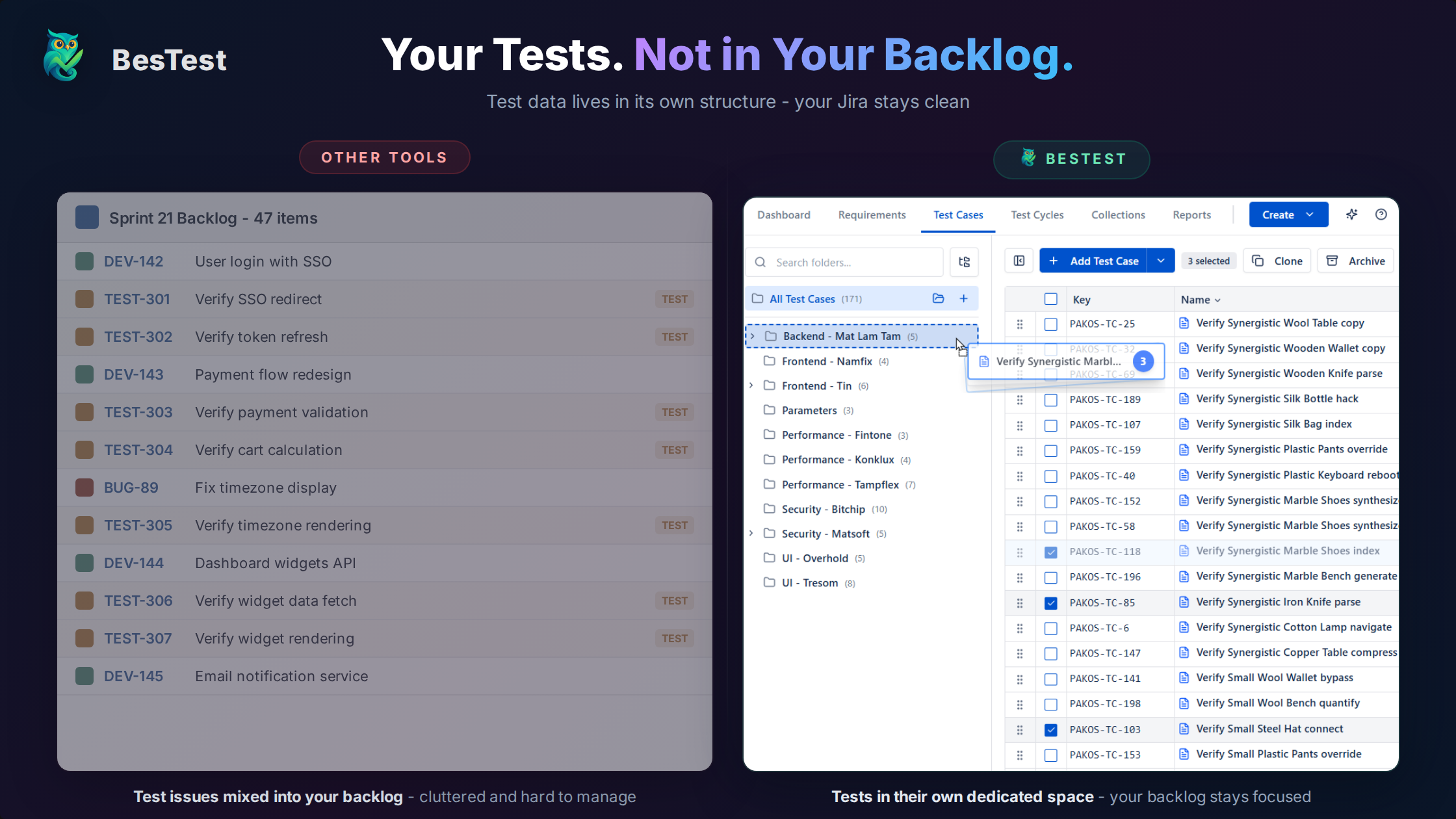
In practice, this means your sprint planning stays snappy, your JQL queries return in milliseconds, and your Jira admin doesn't have to deal with test-related issue types cluttering their configuration.
The Trade-off:
- •No JQL for test cases (use the tool's own search and filters instead)
- •Data in two places (though linked)
- •A second query language to learn, although some, like BesTest's BQL, deliberately mirror JQL
Is It Worth It?
For most teams, yes. The performance and cleanliness benefits outweigh JQL convenience. You can still:
- •Link tests to Jira issues
- •See test status on user stories
- •Create Jira bugs from failed tests
- •Report on testing alongside development
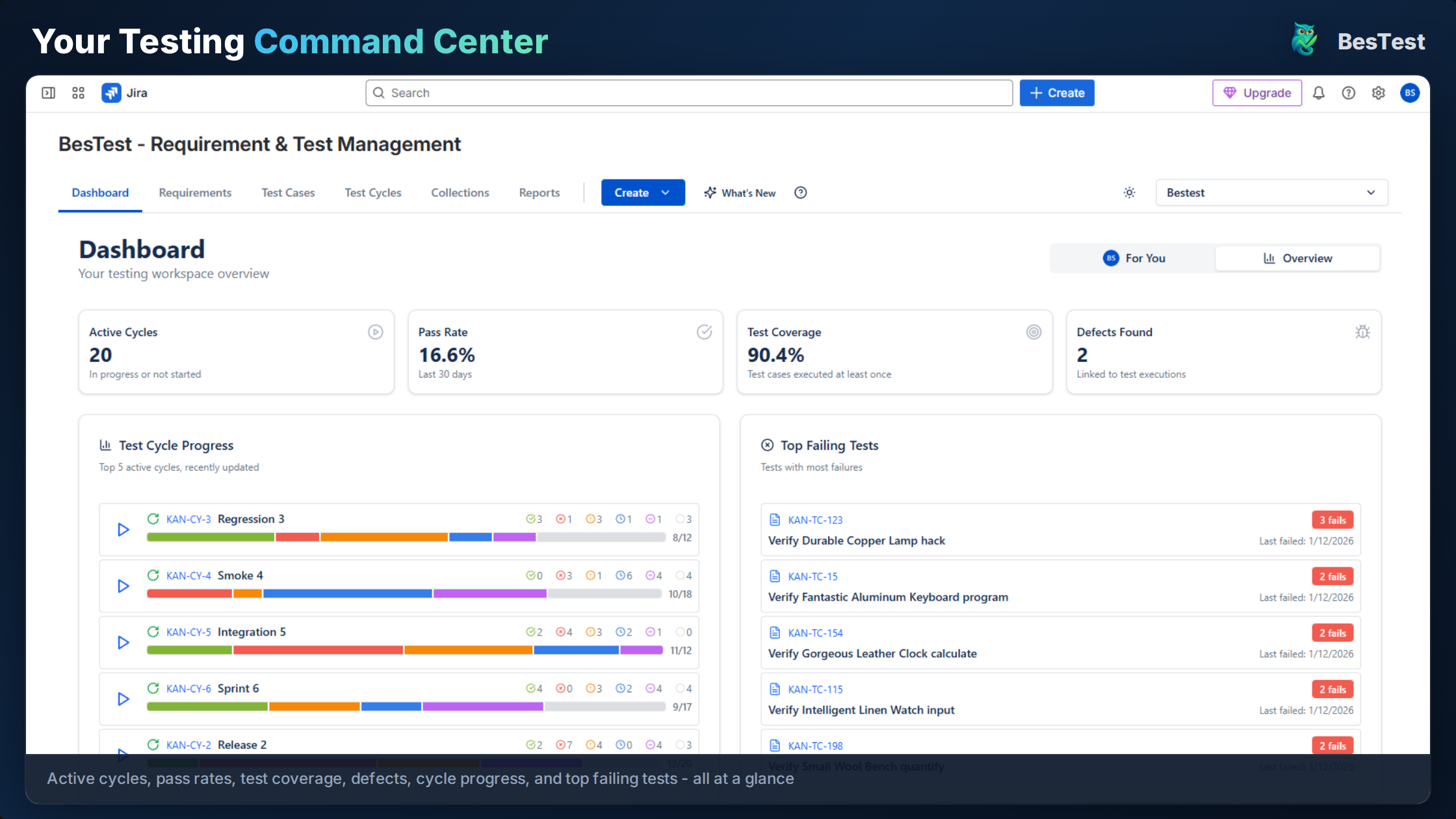
BesTest is built on Atlassian Forge and keeps requirements, test cases, cycles and executions in a dedicated database, not in Jira's issue tables. You get a Jira-native experience without the issue bloat: no extra issue types, no cluttered JQL results, and your issue count stays the same however many tests you run. Bugs found during testing are still real Jira issues, linked to the run that found them.
Migrating Away from Issue Bloat
If you're experiencing issue bloat, here's how to address it:
Option 1: Archive Old Test Issues
- •Identify test issues no longer needed
- •Use Jira archive feature (Cloud) or project archiving
- •Reduces active issue count
Option 2: Delete Obsolete Data
- •Export test data for records
- •Bulk delete old test executions
- •Keep only current/relevant tests
- •Caution: Permanent data loss
Option 3: Migrate to Separate-Storage Tool
- •Export test cases from current tool
- •Import into a tool like BesTest (its CSV import takes up to 10,000 rows per file and validates before anything is created)
- •Decommission old test issues over time
- •Plan for parallel running period
Coming from Xray or Zephyr Scale specifically? The Xray migration guide and Zephyr Scale migration guide walk through the export, the column mapping and what to check afterwards.
Migration Considerations:
- •Preserve test case content and steps
- •Maintain traceability links where possible
- •Archive historical execution data
- •Train team on new tool
When choosing a test management tool, ask these questions:
- How is test data stored? (Jira issues or separate storage?)
- What's the expected data volume over 3 years?
- Will this scale to 50,000+ test cases without affecting Jira?
Frequently Asked Questions
Which test management tools store tests as Jira issues?
Xray and RTM (Requirements & Test Management) store test data as Jira issues. Zephyr Scale and BesTest use separate storage. Check the tool's documentation or ask the vendor about their data architecture before choosing.
How many issues before Jira slows down?
It depends on your Jira tier and configuration, but performance degradation typically becomes noticeable around 100,000-500,000 issues. Cloud has different limits than Data Center. The key is not just count but also query patterns and index size.
Can I use JQL with tools that have separate storage?
Not for test case queries-you'll use the tool's own search. But you can still use JQL for linked Jira issues (stories, bugs) and the tools typically offer robust search within their interface.
Where does BesTest keep test data, if not in Jira issues?
BesTest is built on Atlassian Forge and keeps test data in a dedicated database, separate from Jira's issue tables, hosted in the EU, US or India. Your requirements, test cases, executions and results never add to your Jira issue count or affect Jira performance.
The issues you already have are sunk. The next five thousand are a choice.
Archiving historical test issues is worth doing once. Deciding where the next release cycle writes its results is worth doing now, because that is the decision that repeats every sprint. BesTest keeps test cases, cycles and executions in a dedicated database and out of your issue count, while defects stay real Jira issues where they belong. A Jira app rather than a separate tool, free for up to 10 users.
View on the Atlassian Marketplace
Balázs Szakál
Founder & QA Lead at BesTest
Founder of BesTest and QA professional with extensive experience in software testing, test management, and Jira administration. Built BesTest to give testing teams complete visibility from requirements to release.
More about the team →