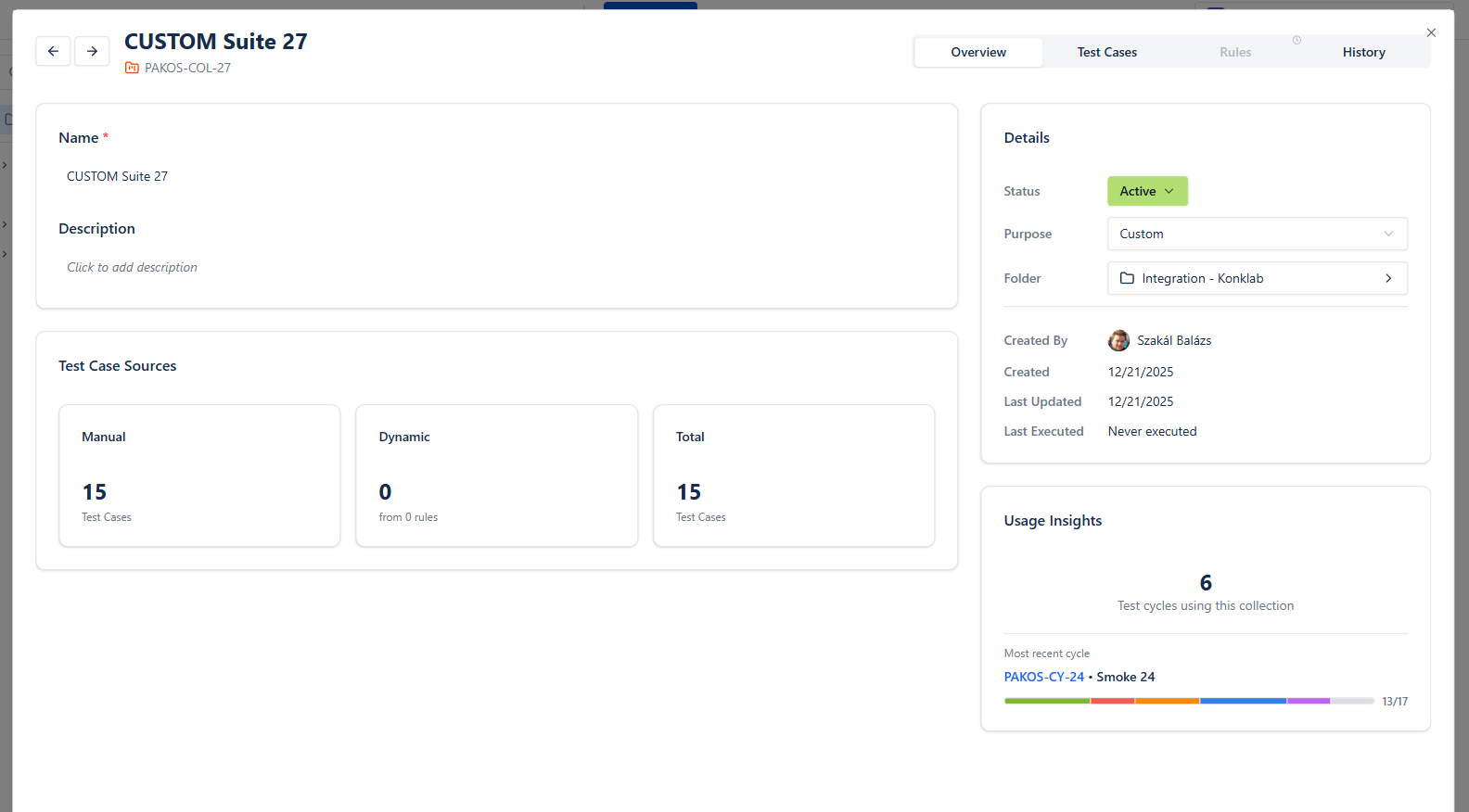

What Are Smart Collections?
Smart Collections are rule-based groups of test cases that update themselves automatically: you define the criteria once, and BesTest maintains the collection as your test suite changes. Think of a Smart Collection as a saved search that always returns current results - it stores rules, not test cases, and resolves the matching tests dynamically every time you open or use it.
That one idea removes the most tedious part of cycle planning. With Smart Collections you can:
- •Populate a test cycle in one click instead of hand-picking tests from a list of hundreds
- •Keep a regression suite current automatically - tag a new test case "regression" and it's in
- •Maintain module suites ("Billing Module Tests") that grow with the module
- •Build re-test sets instantly from tests that failed in the last cycle
- •Spot coverage gaps with collections like "never executed" or "untested this sprint"
The rest of this tutorial builds a real collection, walks through the rule types, uses the collection to create a test cycle, and covers what to do when a collection doesn't behave the way you expect.
Creating Your First Smart Collection
Let's build the most useful collection first: a regression suite. You'll need BesTest enabled on your project and at least a handful of test cases (see the getting started guide if you're not there yet).
Open the Smart Collections Area
- •Open your Jira project
- •Click "BesTest" in the project menu bar at the top
- •Go to the Smart Collections area
Create the Collection
- •Click "Create Smart Collection"
- •Enter the name: "Regression Suite"
- •Add a description: "All test cases tagged for regression testing. Use to populate regression cycles before every release."
Define the Rule
Now tell BesTest which test cases belong here. Add one rule:
- •Tag equals "regression"
That single rule captures every test case in your project carrying the "regression" tag - including ones you create next month.
Save and Verify
- •Click "Save"
- •The collection view lists every test case currently matching the rule
- •Scan the list: do you see the tests you expected? Roughly the right count?

If the list is empty, no test cases carry the "regression" tag yet. Open two or three of your most important test cases, add the tag, and return to the collection - they'll be in it. (If it's still empty, jump to the troubleshooting section below.)
A Second Example: Module-Specific Collection
Repeat the same flow for a module suite:
- •Click "Create Smart Collection" and name it "Billing Module Tests"
- •Set the rule: test cases linked to requirements with component equals "Billing"
- •Click "Save"
Now every test case that traces back to a billing requirement is grouped automatically. When the billing team adds new requirements and test cases, the collection grows with them - no maintenance needed.
Smart Collection Rules and Filters
Rules are the engine of a Smart Collection. Here are the criteria you can filter on, and how to combine them.
Available Filter Criteria
| Filter | Description | Example Use |
|---|---|---|
| Tags | Match test cases by one or more tags | Tag = "regression" or "smoke" |
| Priority | Filter by test case priority level | Priority = "High" or "Critical" |
| Labels | Match by label assignments | Label = "billing" |
| Linked Component | Test cases linked to requirements with a specific component | Component = "Authentication" |
| Execution Status | Filter by last execution result | Status = "Failed" (for re-test collections) |
Combining Rules
Add multiple rules to one collection to narrow it down. Three combinations worth copying:
- •Regression + High Priority: Tag = "regression" AND Priority = "High"
A focused regression suite for time-pressured releases - run only the most important regression tests.
- •Module + Not Executed: Component = "Payments" AND Execution Status = "Not Run"
Surfaces payments tests that have never been executed - an instant coverage-gap report.
- •Failed Last Cycle: Execution Status = "Failed"
The starting point for a re-test cycle after bug fixes - only the tests that previously failed.
Remember: every rule you add narrows the result. Two rules means a test case must satisfy both to appear.
Rules Are Evaluated Live
Every time you open a collection or use it to populate a test cycle, BesTest re-evaluates the rules against the current state of your test cases. There is no stale data - and no cleanup either. Remove the "regression" tag from a test case and it drops out of the Regression Suite immediately.
Name Collections So the Team Understands Them
- •Good: "Sprint Regression - Authentication Module"
- •Good: "Smoke Tests - Critical Priority"
- •Avoid: "My Collection" or "Tests 2"
A clear name plus a one-line description means nobody has to open the collection to know what it's for.
The Payoff: Populating Test Cycles in One Click
This is why Smart Collections exist. Picture a regression cycle with 80 test cases: selecting them by hand means scrolling, searching, and double-checking - and hoping nothing was missed. With a Smart Collection it's one selection, and teams using them this way report saving 10+ hours per sprint on cycle planning alone.
Creating a Cycle from a Smart Collection
- •Go to the "Test Cycles" section in BesTest
- •Click "Create Test Cycle"
- •Fill in the cycle details (name, description, start and end dates)
- •Switch to the "Test Cases" tab and select the "From Smart Collection" option
- •Choose the collection (e.g., "Regression Suite")
- •All matching test cases are added at once
- •Assign testers and click "Save"
The cycle now contains a snapshot of the collection's test cases at the moment of creation. If new test cases match the rules afterwards, they appear in the collection but not in the already-created cycle. This is by design: a test cycle is a fixed plan of what to execute, while the collection keeps evolving for the next cycle. Next sprint, you create a fresh cycle from the same collection and automatically pick up everything added since - that's the loop that compounds the time savings release after release.
Cycle Patterns That Teams Run on Repeat
- •Full regression cycle from "Regression Suite" - before every major release
- •Smoke test cycle from "Smoke Tests - Critical Priority" - after every deployment
- •Re-test cycle from "Failed Last Cycle" - right after bug fixes land
- •Module cycle from "Billing Module Tests" - whenever billing code changes
Each of these turns a planning meeting into a two-minute task: create cycle, pick collection, assign, save.
Combining Multiple Collections
You can add test cases from more than one Smart Collection into a single cycle - for example, "Smoke Tests" plus "Billing Module Tests" when a billing change ships. BesTest handles deduplication automatically: a test case that appears in both collections is added to the cycle only once.
Want to see how collections look in the product? The interactive view below is the real BesTest UI - browse the collections and their resolved test case lists.
Live preview - this is the real BesTest UI
Troubleshooting Smart Collections
Smart Collections are simple machines: rules in, test cases out. When the output looks wrong, the cause is almost always in the rules or the metadata. Here are the common cases.
The Collection Is Empty
Two usual suspects:
- •Tag mismatch. The rule says Tag = "regression" but your test cases are tagged "Regression", "regress", or "reg-test". Open a test case you expect to match and compare its tags character by character against the rule - typos and spelling variants are invisible at a glance but fatal to a rule match. Fix by standardizing the tag on the test cases (preferred, since it cleans your metadata for every future collection) or by adjusting the rule to the tag your team actually uses.
- •Rules too narrow. Every rule is an AND - a collection with Tag = "regression" AND Priority = "Critical" AND Component = "Payments" only matches tests satisfying all three. Remove rules one at a time until results appear; the last rule you removed is the one filtering everything out.
The Collection Is Too Large
If "Regression Suite" resolves to 400 test cases and your team can execute 80 per cycle, the collection is honest but unusable. Options:
- •Add a narrowing rule: Tag = "regression" AND Priority = "High" gives you a priority-tier suite
- •Split by module: "Regression - Checkout", "Regression - Auth", and so on, run in rotation
- •Re-examine the tag: if half your suite is tagged "regression", the tag has stopped meaning anything - reserve it for tests that genuinely guard existing behavior
A good sanity check: the collection should resolve to a set your team can realistically execute in the cycle length you actually run. If it can't, narrow the rules until it does.
"I Expected Folders, Not Rules"
Folders and Smart Collections solve different problems. Folders are static organization: a test case lives in exactly one place, and moving it is a manual act. Smart Collections are dynamic membership: a test case can match many collections at once, and membership changes by itself when the test case's properties change. Use folders to organize your library by feature area; use collections to answer "which tests should run in this cycle?"
When a Static Selection Beats a Smart Collection
Not every cycle needs a collection. Add test cases manually (search and select in the "Test Cases" tab) when:
- •It's a one-off cycle - an exploratory session or a hotfix verification with three specific tests
- •You need a hand-picked set - a UAT cycle where a stakeholder chose exactly which workflows to sign off
- •The selection has no repeatable rule behind it - if you can't express the membership as criteria, forcing a collection just creates a rule nobody understands
The rule of thumb: if you'll need the same kind of selection again next sprint, make it a Smart Collection. If it's a one-time pick, just select the tests.
Best Practices for Smart Collections
A few habits will keep your collections useful as the test suite scales.
Start with Three Core Collections
- •Regression Suite: all test cases tagged "regression" - your safety net before releases
- •Smoke Tests: high-priority or critical test cases - a quick post-deployment check
- •Failed Tests: test cases that failed in the most recent cycle - the starting point for re-test cycles
These cover the most common scenarios. Add more only when a genuine need arises - five well-maintained collections beat twenty abandoned ones.
Tag Test Cases Consistently
Smart Collections are only as good as the metadata on your test cases. If one person writes "regression," another "regress," and a third "reg-test," your collections will silently miss items. Agree on a convention and document it:
- •regression - include in regression suite
- •smoke - include in smoke tests
- •module:billing, module:auth, module:reporting - module grouping
Review Collections Monthly
Collections update themselves, but rules go stale. Once a month, check: are the rules still relevant? Has tagging stayed consistent? Are any collections empty, oversized, or redundant? A ten-minute review prevents collection sprawl.
Document the Purpose
Use the description field on each collection to state when and why it should be used ("Use to populate regression cycles before every release"). A new team member should be able to read the collection list and understand your testing strategy without asking anyone.
Next step: put a collection to work - create a cycle from your new Regression Suite by following the test cycle tutorial.
Frequently Asked Questions
Do Smart Collections update automatically when I add new test cases?
Yes. Smart Collections evaluate their rules dynamically. When you add a new test case that matches the collection's criteria (for example, it has the "regression" tag), it appears in the collection automatically. No manual update is needed.
If I add tests from a Smart Collection to a cycle, does the cycle update when the collection changes?
No. When you create a test cycle from a Smart Collection, the cycle captures a snapshot of the matching test cases at that moment. The cycle is a fixed plan. If new test cases match the collection later, they appear in the collection but not in the already-created cycle. This is intentional - a cycle represents a specific set of tests to execute.
Can I combine multiple Smart Collections into one test cycle?
Yes. When creating a test cycle, you can add test cases from multiple Smart Collections. BesTest handles deduplication, so if the same test case appears in two collections, it is only added to the cycle once.
Why is my Smart Collection empty?
Usually one of two reasons: a tag mismatch (the rule says "regression" but your test cases use a different spelling or capitalization) or rules that are too narrow (multiple rules combine with AND, so a test case must match all of them). Compare the rule against the actual tags on a test case you expect to match, and remove rules one at a time until results appear.
Automate Your Test Cycles
Install BesTest and create your first Smart Collection in minutes. Free for up to 10 users.
Install BesTest Free